> ## Documentation Index
> Fetch the complete documentation index at: https://docs.mx.com/llms.txt
> Use this file to discover all available pages before exploring further.
# Instant Account Verification
> Get account and routing numbers for demand deposit accounts
**NEW TO MX CONNECTIVITY?**
See the [Connectivity Overview](/products/connectivity/overview) to learn about our Connectivity products and integration options.
Use the Connect Widget and Platform API to let end users connect to their accounts.
Use the Platform API to power a non-MX UI connection experience.
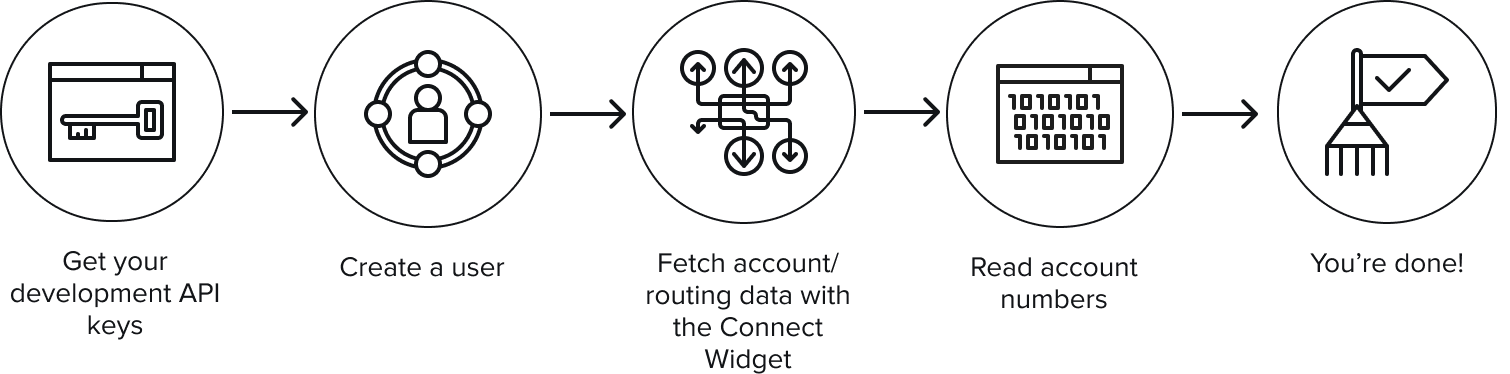
With Instant Account Verification, you can connect to an end user's financial institution and retrieve account and routing numbers for their demand deposit accounts. You can use this data for any number of solutions such as moving money or account opening. In many cases, Instant Account Verification must be used in conjunction with Account Owner Identification and Balance Checks to prevent problems like ACH returns.
 ## Tokenized Account Numbers
Tokenized Account Numbers (TANs) are substitute account numbers used for secure ACH money movement. When users connect accounts via OAuth with supported institutions (Chase and U.S. Bank), the institution provides a TAN instead of the actual account number. This enhances security and gives users greater control—each application receives a unique TAN for the same bank account, allowing per-application access management without exposing underlying account details.
**Key properties:**
* The TAN and routing number are valid for ACH transfers **only when used together**. They won't work for wire transfers, and third-party verification services may not recognize them.
* Using a TAN with a different routing number—even from the same institution—will cause the transfer to fail.
* OAuth connections: Call `/users/{user_guid}/members/{member_guid}/account_numbers` to retrieve the TAN in the `account_number` field.
* Non-OAuth connections: Return traditional (non-tokenized) account and routing numbers.
Do not display the TAN in your UI—users won't recognize it. Show the masked account number from the `/users/{user_guid}/accounts` endpoint instead.
**Institution-specific behavior:**
| Institution | TAN Behavior |
| :---------- | :-------------------------------------------------------------------------------------------------------------------------------------------------------------- |
| Chase | TAN becomes invalid if MX revokes consent, the user revokes consent directly, or Chase flags the account for fraud. |
| U.S. Bank | TAN remains active for money movement even after the MX connection is deleted. See the [U.S. Bank Developer Portal](https://developer.usbank.com/) for details. |
## Quick Links
Learn about the full features of the Platform API.
Learn about the Connect Widget.
View the demo app on GitHub.
## Account Number Sample Data
This sample response shows the data you can expect to get for account owners.
```json theme={null}
{
"account_numbers": [
{
"account_guid": "ACT-82a93692-f756-534f-9b2e-ad10a0f38462",
"account_number": "10001",
"institution_number": null,
"member_guid": "MBR-3bdc7d6b-efd4-1497-a0af-b23501cf9bd0",
"routing_number": "091000019",
"passed_validation": true,
"transit_number": null,
"user_guid": "USR-11141024-90b3-1bce-cac9-c06ced52ab4c"
}
],
"pagination": {
"current_page": 1,
"per_page": 25,
"total_entries": 1,
"total_pages": 1
}
}
```
## Related Products
Get account owner information like name, address, and email.
Get account and transaction data.
Prevent returns and other costly errors.
## Tokenized Account Numbers
Tokenized Account Numbers (TANs) are substitute account numbers used for secure ACH money movement. When users connect accounts via OAuth with supported institutions (Chase and U.S. Bank), the institution provides a TAN instead of the actual account number. This enhances security and gives users greater control—each application receives a unique TAN for the same bank account, allowing per-application access management without exposing underlying account details.
**Key properties:**
* The TAN and routing number are valid for ACH transfers **only when used together**. They won't work for wire transfers, and third-party verification services may not recognize them.
* Using a TAN with a different routing number—even from the same institution—will cause the transfer to fail.
* OAuth connections: Call `/users/{user_guid}/members/{member_guid}/account_numbers` to retrieve the TAN in the `account_number` field.
* Non-OAuth connections: Return traditional (non-tokenized) account and routing numbers.
Do not display the TAN in your UI—users won't recognize it. Show the masked account number from the `/users/{user_guid}/accounts` endpoint instead.
**Institution-specific behavior:**
| Institution | TAN Behavior |
| :---------- | :-------------------------------------------------------------------------------------------------------------------------------------------------------------- |
| Chase | TAN becomes invalid if MX revokes consent, the user revokes consent directly, or Chase flags the account for fraud. |
| U.S. Bank | TAN remains active for money movement even after the MX connection is deleted. See the [U.S. Bank Developer Portal](https://developer.usbank.com/) for details. |
## Quick Links
Learn about the full features of the Platform API.
Learn about the Connect Widget.
View the demo app on GitHub.
## Account Number Sample Data
This sample response shows the data you can expect to get for account owners.
```json theme={null}
{
"account_numbers": [
{
"account_guid": "ACT-82a93692-f756-534f-9b2e-ad10a0f38462",
"account_number": "10001",
"institution_number": null,
"member_guid": "MBR-3bdc7d6b-efd4-1497-a0af-b23501cf9bd0",
"routing_number": "091000019",
"passed_validation": true,
"transit_number": null,
"user_guid": "USR-11141024-90b3-1bce-cac9-c06ced52ab4c"
}
],
"pagination": {
"current_page": 1,
"per_page": 25,
"total_entries": 1,
"total_pages": 1
}
}
```
## Related Products
Get account owner information like name, address, and email.
Get account and transaction data.
Prevent returns and other costly errors.