> ## Documentation Index
> Fetch the complete documentation index at: https://docs.mx.com/llms.txt
> Use this file to discover all available pages before exploring further.
# Microdeposits Workflow in the Connect Widget
To verify account information with microdeposits:
1. [Request a microdeposit verification](#1-requesting-workflow) when an end user searches for an institution that doesn't support Instant Account Verification.
2. [Prompt the end user to verify](#2-verifying-workflow) their deposit amounts.
## 1. Requesting Workflow
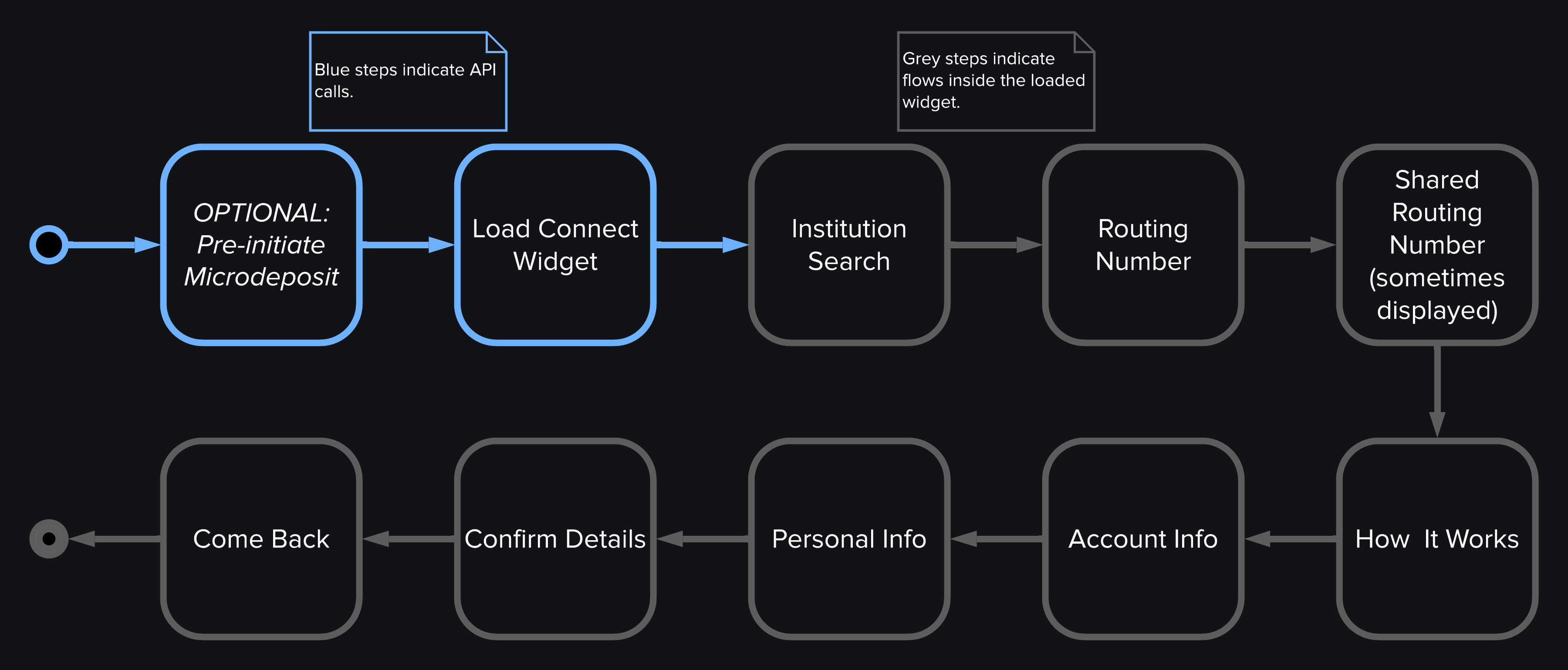 To let end users request a microdeposit verification using their account numbers:
1. Request a Widget URL with `widget_type` set to `connect_widget` and `data_request.products` set to include `account_verification`.
2. The widget loads, which triggers the [Connect Loaded](/connect/widget-events#connect-loaded) widget event.
3. End user searches for an institution (which triggers the [Institution Search](/connect/widget-events#institution-search) widget event) then selects an institution (which triggers the [Institution Selected](/connect/widget-events#institution-selected) widget event).
4. The institution the end user selected doesn't support instant account verification. The end user then selects the option to verify using account numbers, which triggers the [Microdeposit Flow Loaded](/connect/widget-events#microdeposit-flow-loaded) widget event.
* **Routing number**: If the user enters a blocked routing number, the [Blocked Routing Number](/connect/widget-events#microdeposit-blocked-routing-number) widget event is triggered. Depending on the reason given in the event, the verification process either can't proceed or the widget will suggest the end user follows the instant account verification flow.
* **Account information**: Such as account type and number.
* **Account holder information**: Such as first name, last name, and email.
5. End user reviews and confirms what they entered.
6. [Account Details Submitted](/connect/widget-events#microdeposit-account-details-submitted) widget event triggers, containing a `microdeposit_guid` in the `metadata`. You **must** save this `microdeposit_guid`, since you'll use it when the end user returns to verify their deposit amounts.
7. Widget informs the end user to check back soon after they see two small deposits in their account to confirm those amounts. When the end user selects the primary button on this screen, the [Microdeposit Come Back, Primary Action Selected](/connect/widget-events#microdeposit-come-back-primary-action-selected) widget event is triggered.
**NOTE**
In the microdeposit flow, no `member` is created.
## 2. Verifying Workflow
To let end users request a microdeposit verification using their account numbers:
1. Request a Widget URL with `widget_type` set to `connect_widget` and `data_request.products` set to include `account_verification`.
2. The widget loads, which triggers the [Connect Loaded](/connect/widget-events#connect-loaded) widget event.
3. End user searches for an institution (which triggers the [Institution Search](/connect/widget-events#institution-search) widget event) then selects an institution (which triggers the [Institution Selected](/connect/widget-events#institution-selected) widget event).
4. The institution the end user selected doesn't support instant account verification. The end user then selects the option to verify using account numbers, which triggers the [Microdeposit Flow Loaded](/connect/widget-events#microdeposit-flow-loaded) widget event.
* **Routing number**: If the user enters a blocked routing number, the [Blocked Routing Number](/connect/widget-events#microdeposit-blocked-routing-number) widget event is triggered. Depending on the reason given in the event, the verification process either can't proceed or the widget will suggest the end user follows the instant account verification flow.
* **Account information**: Such as account type and number.
* **Account holder information**: Such as first name, last name, and email.
5. End user reviews and confirms what they entered.
6. [Account Details Submitted](/connect/widget-events#microdeposit-account-details-submitted) widget event triggers, containing a `microdeposit_guid` in the `metadata`. You **must** save this `microdeposit_guid`, since you'll use it when the end user returns to verify their deposit amounts.
7. Widget informs the end user to check back soon after they see two small deposits in their account to confirm those amounts. When the end user selects the primary button on this screen, the [Microdeposit Come Back, Primary Action Selected](/connect/widget-events#microdeposit-come-back-primary-action-selected) widget event is triggered.
**NOTE**
In the microdeposit flow, no `member` is created.
## 2. Verifying Workflow
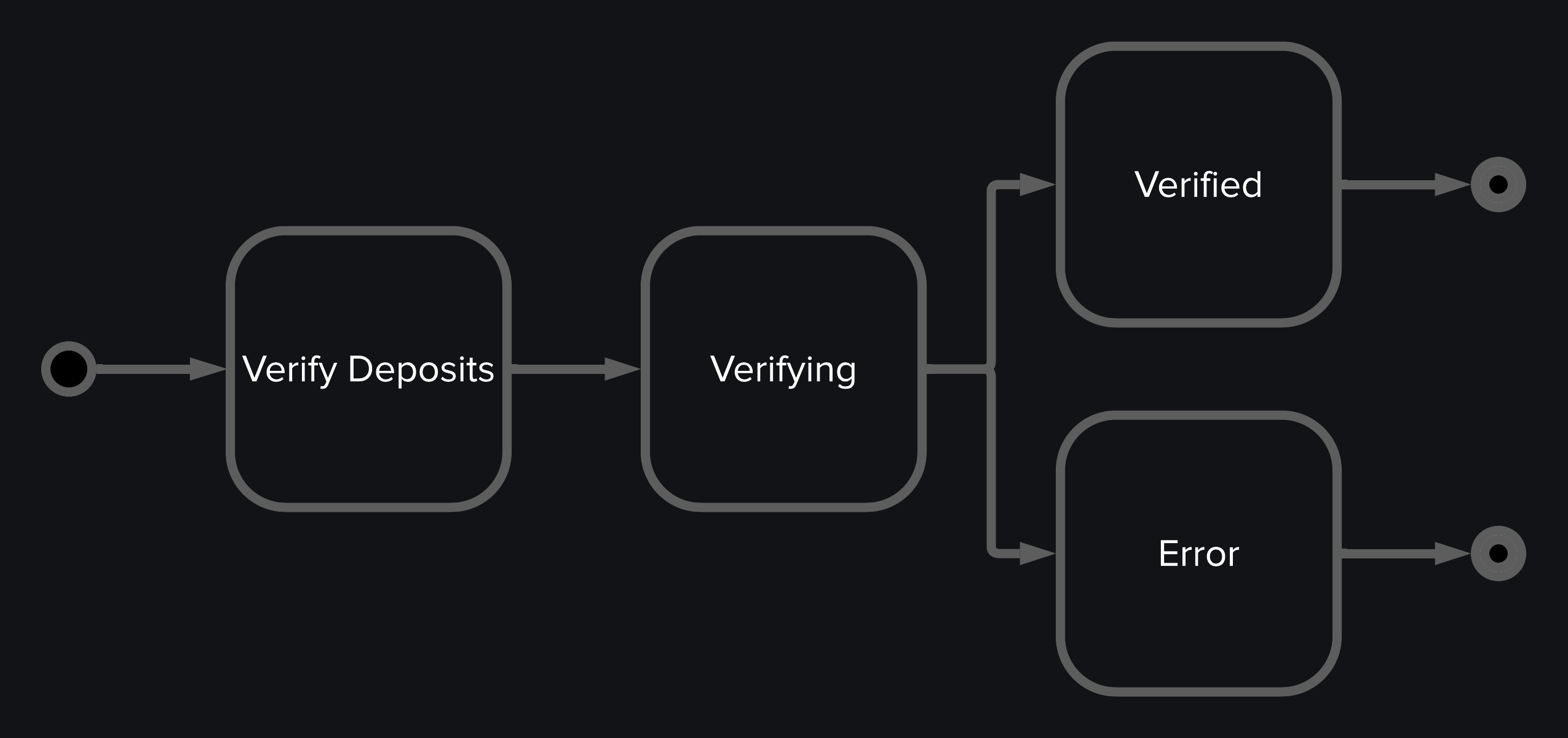 To track the status of microdeposits, you can either use the [Microdeposits webhook](/resources/webhooks/microdeposits) or poll the [Read a Microdeposit for a User](/api-reference/platform-api/reference/microdeposits) endpoint at regular intervals.
This section outlines the microdeposit verification workflow using polling to check the status.
1. Wait at least 36 hours after creating a microdeposit, then begin polling the [Read a Microdeposit](/api-reference/platform-api/reference/microdeposits) endpoint at an interval of 15 minutes until its `status` is either `DEPOSITED` or `ERRORED`. Starting at 36 hours ensures deposits have been processed, though you can begin polling before this time if needed.
2. Once the `status` is `DEPOSITED`, load the Connect Widget. Set `data_request.products` to include `account_verification` and `current_microdeposit_guid` to the `microdeposit_guid` you captured from the [Account Details Submitted](/connect/widget-events#microdeposit-account-details-submitted) widget event.
3. The end user will then enter the two small deposit amounts.
* **Incorrect Amounts**: If the amounts are entered incorrectly, the widget will display an error. The end user can reenter the amounts or select the primary button on this screen, which triggers the [Microdeposit Error, Primary Action Selected](/connect/widget-events#microdeposit-error-primary-action-selected) widget event. You must listen for this event, close the widget, and delete the `microdeposit_guid` by calling the [Delete a Microdeposit](/api-reference/platform-api/reference/microdeposits) endpoint.
* **Correct Amounts**: If the amounts are entered correctly, the [Microdeposit Verified](/connect/widget-events#microdeposit-verified) widget event is triggered. The end user will see a **Verified** screen and then select **Confirm**. This action triggers the [Microdeposit Verified, Primary Action Selected](/connect/widget-events#microdeposit-verified-primary-action-selected) widget event, signaling that you can now safely close the widget and delete the `microdeposit_guid` using the [Delete a Microdeposit](/api-reference/platform-api/reference/microdeposits) endpoint.
**SUCCESS**
You built a flow to let end users verify their accounts using microdeposits.
## Related Widget Events
The following table lists all the widget events that can be triggered during the microdeposits workflow in the Connect Widget. See [Widget Events](/connect/widget-events) to understand how to handle these events and for more complete descriptions and guidance for each event.
| Widget Event | Description |
| :----------------------------------------------------------------------------------------------------------------------- | :------------------------------------------------------------------------------------------------------------------------------------------------------ |
| [Connect Loaded](/connect/widget-events#connect-loaded) | Sent when the Connect Widget loads. |
| [Institution Search](/connect/widget-events#institution-search) | Sent when the end user searches for an institution. |
| [Institution Selected](/connect/widget-events#institution-selected) | Sent when an end user selects an institution from the institution list. |
| [Microdeposit Flow Loaded](/connect/widget-events#microdeposit-flow-loaded) | Sent when the microdeposit flow is loaded in the Connect Widget. |
| [Microdeposit Blocked Routing Number](/connect/widget-events#microdeposit-blocked-routing-number) | Sent when the end user submits a blocked routing number on the **Enter Details** step. |
| [Microdeposit Account Details Submitted](/connect/widget-events#microdeposit-account-details-submitted) | Sent when the end user submits account details for a given institution for the first time and a `microdeposit` object is created on the MX system. |
| [Microdeposit Come Back, Primary Action Selected](/connect/widget-events#microdeposit-come-back-primary-action-selected) | Sent when the end user selects the primary button on the **Come Back** step. This step is visible while the microdeposit is in the `REQUESTED` status. |
| [Microdeposit Error, Primary Action Selected](/connect/widget-events#microdeposit-error-primary-action-selected) | Sent when the end user selects the primary button on the **Error** step. This page is visible after entering deposits and getting a `PREVENTED` status. |
| [Microdeposit Verified](/connect/widget-events#microdeposit-verified) | Sent when an end user successfully verifies the microdeposit amounts. |
| [Microdeposit Verified, Primary Action Selected](/connect/widget-events#microdeposit-verified-primary-action-selected) | Sent when the end user selects the primary button on **Verified** step. This step is visible after entering the correct deposit amounts. |
To track the status of microdeposits, you can either use the [Microdeposits webhook](/resources/webhooks/microdeposits) or poll the [Read a Microdeposit for a User](/api-reference/platform-api/reference/microdeposits) endpoint at regular intervals.
This section outlines the microdeposit verification workflow using polling to check the status.
1. Wait at least 36 hours after creating a microdeposit, then begin polling the [Read a Microdeposit](/api-reference/platform-api/reference/microdeposits) endpoint at an interval of 15 minutes until its `status` is either `DEPOSITED` or `ERRORED`. Starting at 36 hours ensures deposits have been processed, though you can begin polling before this time if needed.
2. Once the `status` is `DEPOSITED`, load the Connect Widget. Set `data_request.products` to include `account_verification` and `current_microdeposit_guid` to the `microdeposit_guid` you captured from the [Account Details Submitted](/connect/widget-events#microdeposit-account-details-submitted) widget event.
3. The end user will then enter the two small deposit amounts.
* **Incorrect Amounts**: If the amounts are entered incorrectly, the widget will display an error. The end user can reenter the amounts or select the primary button on this screen, which triggers the [Microdeposit Error, Primary Action Selected](/connect/widget-events#microdeposit-error-primary-action-selected) widget event. You must listen for this event, close the widget, and delete the `microdeposit_guid` by calling the [Delete a Microdeposit](/api-reference/platform-api/reference/microdeposits) endpoint.
* **Correct Amounts**: If the amounts are entered correctly, the [Microdeposit Verified](/connect/widget-events#microdeposit-verified) widget event is triggered. The end user will see a **Verified** screen and then select **Confirm**. This action triggers the [Microdeposit Verified, Primary Action Selected](/connect/widget-events#microdeposit-verified-primary-action-selected) widget event, signaling that you can now safely close the widget and delete the `microdeposit_guid` using the [Delete a Microdeposit](/api-reference/platform-api/reference/microdeposits) endpoint.
**SUCCESS**
You built a flow to let end users verify their accounts using microdeposits.
## Related Widget Events
The following table lists all the widget events that can be triggered during the microdeposits workflow in the Connect Widget. See [Widget Events](/connect/widget-events) to understand how to handle these events and for more complete descriptions and guidance for each event.
| Widget Event | Description |
| :----------------------------------------------------------------------------------------------------------------------- | :------------------------------------------------------------------------------------------------------------------------------------------------------ |
| [Connect Loaded](/connect/widget-events#connect-loaded) | Sent when the Connect Widget loads. |
| [Institution Search](/connect/widget-events#institution-search) | Sent when the end user searches for an institution. |
| [Institution Selected](/connect/widget-events#institution-selected) | Sent when an end user selects an institution from the institution list. |
| [Microdeposit Flow Loaded](/connect/widget-events#microdeposit-flow-loaded) | Sent when the microdeposit flow is loaded in the Connect Widget. |
| [Microdeposit Blocked Routing Number](/connect/widget-events#microdeposit-blocked-routing-number) | Sent when the end user submits a blocked routing number on the **Enter Details** step. |
| [Microdeposit Account Details Submitted](/connect/widget-events#microdeposit-account-details-submitted) | Sent when the end user submits account details for a given institution for the first time and a `microdeposit` object is created on the MX system. |
| [Microdeposit Come Back, Primary Action Selected](/connect/widget-events#microdeposit-come-back-primary-action-selected) | Sent when the end user selects the primary button on the **Come Back** step. This step is visible while the microdeposit is in the `REQUESTED` status. |
| [Microdeposit Error, Primary Action Selected](/connect/widget-events#microdeposit-error-primary-action-selected) | Sent when the end user selects the primary button on the **Error** step. This page is visible after entering deposits and getting a `PREVENTED` status. |
| [Microdeposit Verified](/connect/widget-events#microdeposit-verified) | Sent when an end user successfully verifies the microdeposit amounts. |
| [Microdeposit Verified, Primary Action Selected](/connect/widget-events#microdeposit-verified-primary-action-selected) | Sent when the end user selects the primary button on **Verified** step. This step is visible after entering the correct deposit amounts. |