> ## Documentation Index
> Fetch the complete documentation index at: https://docs.mx.com/llms.txt
> Use this file to discover all available pages before exploring further.
# MDX Real Time
## What Is Possible With MDX Real Time?
With a Real Time integration, you can help keep users on top of their finances with data available immediately after a financial transaction or account change. As financial records change in a partner's system, requests are made to MX systems to add those records. This ensures that the data with MX is a mirror image of the online banking experience. A Real Time integration offers the fastest possible loading time when opening MX-enabled products as all the data is available at log in. This ensures the end user has a great experience when interacting with MX-enabled products.
MDX Real Time also gives you the ability to pre-load users' financial data onto MX systems for an enhanced initial user experience.
**INFO**
Read our [MDX On Real Time Reference](/api-reference/more-apis/mdx/mdx-real-time/) for more information.
## How Is MDX Real Time Different Than MDX On Demand?
MDX Real Time gives you the ability to **push data to MX** as soon as it becomes available, even without the end user logging in. This means you can trigger real-time alerts without the end user having to log in. You have complete control over what data is sent and when it is sent to MX. Because of this, **you** are responsible for reconciling a user's data by managing `POSTED` and `PENDING` transactions as well as other changes to the data. Essentially, MX accepts whatever data actions you send.
MDX On Demand, on the other hand, is when **MX makes requests to you** to pull data. Because MX is requesting, we'll pull the last 15 days of a user's data to perform reconciliation. With On Demand, MX only pulls data when a user logs in or during background aggregation if that user hasn't had a successful log in attempt in 24 hours.
## Required APIs for a Real Time Integration
1. MDX Real Time (user and member creation)
2. SSO (authenticating users and opening software)
These two APIs are responsible for delivering the user's financial data to MX, authenticating a user, and displaying the software to the end user once they have been authenticated.
## How Is Data Pushed to MX?
 Users, members, accounts, and transactions are created, updated, or deleted by you with the MDX Real Time API. These requests are ongoing and are triggered by a record being created, updated, or deleted in your system. This enables all the end user's data to be on MX systems before they log into the service.
## Creating a Queue to Push Data to MX
Users, members, accounts, and transactions are created, updated, or deleted by you with the MDX Real Time API. These requests are ongoing and are triggered by a record being created, updated, or deleted in your system. This enables all the end user's data to be on MX systems before they log into the service.
## Creating a Queue to Push Data to MX
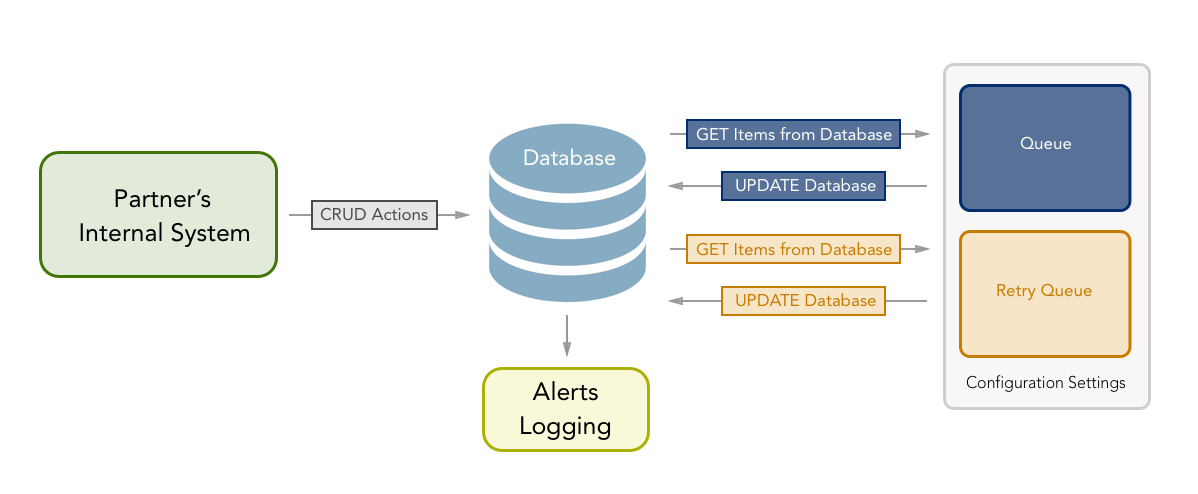 This diagram shows how a partner might implement a queue to push real-time data to MX. This solution consists of adding action items to a database or cache and then processing those actions by pulling them into a queue, then using MDX Real Time to push that data to MX.
Depending on the level of integration, a partner's system may have several actions that would need to trigger a call to the MX Real Time API in order to create, update, or delete objects in the MX system. Below is an example list of some events that would call a method to trigger an MDX Real Time API call.
* User is created
* Account is created
* Account balance changes
* Pending transaction is created
* Pending transaction posts
* Partner's system uses a nightly batch to push daily transactions
## Queue Processing Service
The queue processing service will need to handle processing newly added actions and retrying for calls that don't succeed the first time. Some configuration settings that will be used in these examples follow:
* `RetryThreshold`: How many retries should be attempted before discontinuation.
* `RetryFrequency`: How often failed actions are retried.
The queue processing service would determine which API action to call based on the MXAction item.
### Initial Queue
This is the first queue that will attempt to push data to MX. The processing for the initial queue will have either a listener or a real-time read for when a new object is added to the database so it can immediately try to push to MX. The initial queue will also attempt each call twice before updating the database. This is to avoid failures due to race conditions.
### Retry Queue
If an action fails twice it will be added to a retry queue which will be processed differently than the initial queue. The retry queue will be processed based on the `RetryFrequency` configuration and will run periodically by pulling items that need to be retried and attempting them once per pass.
### History and Alerts Logging
Because it's possible to have actions that never succeed, you should implement logs and alerts. Some useful alerts might include:
* Alert when an action fails to succeed the initial attempt.
* Alert when an action has failed and the retry threshold has been reached.
## Best Practices for API Call Processes
In order to create objects in the MX system, a tree structure of objects must exist above it according to the [MX Data Architecture](/products/connectivity/overview/data-architecture). The hierarchy is as follows: user > member > account > transaction. If you try to create a lower-level object before the parent object exists, you'll get an error.
The following is an example of the steps necessary for creating a transaction, including possible errors and steps to resolve them.
1. Create transaction
* 200 Response: UPDATE Account
* 404 Response: Go to Step 2
* 409 Response: Transaction already exists
2. Create account
* 200 Response: Go to Step 1
* 409 Response: Go to Step 1
* 404 Response: Go to Step 3.2
3. Create user/member
1. Create member
* 200 Response: Go to Step 2
* 409 Response: Go to Step 2
* 404 Response: Go to Step 3.2
2. Create user
* 200 Response: Go to Step 3.1
* 409 Response: Go to Step 3.1
* 404 Response: Double check `client_id` and URL
A complete list of error codes and their definitions can be found [here](/api-reference/more-apis/mdx/mdx-real-time/#errors).
## Creating API Scripts
In addition to building API calls and logic into online banking platforms, partners may also need to update large sets of data on MX's servers. If this is needed, MX recommends partners create a program or script which can loop through a table and perform simple API calls for each object. One common example is deleting a set of Users. The example that follows shows how an API script can be used to accomplish this task with little effort.
### Best Practices
Before running any scripts to update large sets of data, please contact MX. This allows our teams to be aware of any increase in traffic and monitor for potential issues that may appear.
### 3-Step Process: Example
Running a script to update a set of data entities can best be summarized in three steps:
1. Get a list of IDs for the objects to be updated.
2. Determine the API call to be made.
3. Create a loop to perform the API action for each entity.
Let's say you want to delete inactive users from the MX platform. Using the 3-step process, you could identify and delete these users with an API script.
1. Get a list of `id`s.
* Identify which users to delete based on your own analytics, and create a list of `id`s for those users. For this example, we will assume that a list of inactive users has been identified and exported to a CSV file.
* If the objects being updated are further down the chain of the MX architecture, the `id`s of all parent objects must also be included. To update an account, for example, will require the `client_id`, `user_id`, `member_id`, and `account_id`.
2. Determine the API actions to perform.
* The appropriate API endpoint to delete a user is [`DELETE /users/{user_id}`](/api-reference/more-apis/mdx/mdx-real-time/reference/users/delete-user), so our script must include a method that calls that endpoint.
3. Create a loop to perform the API action for each object
* Step 3 involves importing our file into a data structure, using a loop to call the API method on each item in the data structure, and outputting a log to track the results. In our example, we'll pull the CSV file into a map structure. We then loop through the map, call the `mdx_delete_user` method on each iteration, and output a success or failure message to the console.
* MX asks that you always include a throttle so that our system does not become overburdened. This is particularly important when deleting users since deleting a user will automatically cascade and delete all objects associated with that user. In this example we are performing delete user requests, so we'll add a time delay of 0.5 seconds after each cycle.
**Example for Deleting a User in Ruby**
```ruby theme={null}
require 'net/http'
def mdx_delete_user(options)
uri = URI("https://int-live.moneydesktop.com")
uri.path << "/#{options[:client_id]}/users/#{options[:user_id]}"
request = ::Net::HTTP::Delete.new(uri)
request["Accept"] = "application/vnd.moneydesktop.mdx.v5+json"
request["MD-API-KEY"] = options[:api_key]
response = ::Net::HTTP.start(uri.host, uri.port, :use_ssl => true) do |http|
http.request(request)
end
end
```
**Example Loop in Ruby**
```ruby theme={null}
require 'csv'
user_list = CSV.table("users_to_delete.csv").map { |row| row.to_hash }
user_list.each do |user|
response = mdx_delete_user(
:api_key => ":api_key",
:client_id => ":client_id",
:user_id => user[:user_id]
)
case response
when ::Net::HTTPNoContent
puts "[SUCCESS] [#{response.code}] [#{user[:user_id]} user deleted]"
else
puts "[FAILURE] [#{response.code}] [#{user[:user_id]} user not deleted]"
end
sleep 0.5
end
```
This diagram shows how a partner might implement a queue to push real-time data to MX. This solution consists of adding action items to a database or cache and then processing those actions by pulling them into a queue, then using MDX Real Time to push that data to MX.
Depending on the level of integration, a partner's system may have several actions that would need to trigger a call to the MX Real Time API in order to create, update, or delete objects in the MX system. Below is an example list of some events that would call a method to trigger an MDX Real Time API call.
* User is created
* Account is created
* Account balance changes
* Pending transaction is created
* Pending transaction posts
* Partner's system uses a nightly batch to push daily transactions
## Queue Processing Service
The queue processing service will need to handle processing newly added actions and retrying for calls that don't succeed the first time. Some configuration settings that will be used in these examples follow:
* `RetryThreshold`: How many retries should be attempted before discontinuation.
* `RetryFrequency`: How often failed actions are retried.
The queue processing service would determine which API action to call based on the MXAction item.
### Initial Queue
This is the first queue that will attempt to push data to MX. The processing for the initial queue will have either a listener or a real-time read for when a new object is added to the database so it can immediately try to push to MX. The initial queue will also attempt each call twice before updating the database. This is to avoid failures due to race conditions.
### Retry Queue
If an action fails twice it will be added to a retry queue which will be processed differently than the initial queue. The retry queue will be processed based on the `RetryFrequency` configuration and will run periodically by pulling items that need to be retried and attempting them once per pass.
### History and Alerts Logging
Because it's possible to have actions that never succeed, you should implement logs and alerts. Some useful alerts might include:
* Alert when an action fails to succeed the initial attempt.
* Alert when an action has failed and the retry threshold has been reached.
## Best Practices for API Call Processes
In order to create objects in the MX system, a tree structure of objects must exist above it according to the [MX Data Architecture](/products/connectivity/overview/data-architecture). The hierarchy is as follows: user > member > account > transaction. If you try to create a lower-level object before the parent object exists, you'll get an error.
The following is an example of the steps necessary for creating a transaction, including possible errors and steps to resolve them.
1. Create transaction
* 200 Response: UPDATE Account
* 404 Response: Go to Step 2
* 409 Response: Transaction already exists
2. Create account
* 200 Response: Go to Step 1
* 409 Response: Go to Step 1
* 404 Response: Go to Step 3.2
3. Create user/member
1. Create member
* 200 Response: Go to Step 2
* 409 Response: Go to Step 2
* 404 Response: Go to Step 3.2
2. Create user
* 200 Response: Go to Step 3.1
* 409 Response: Go to Step 3.1
* 404 Response: Double check `client_id` and URL
A complete list of error codes and their definitions can be found [here](/api-reference/more-apis/mdx/mdx-real-time/#errors).
## Creating API Scripts
In addition to building API calls and logic into online banking platforms, partners may also need to update large sets of data on MX's servers. If this is needed, MX recommends partners create a program or script which can loop through a table and perform simple API calls for each object. One common example is deleting a set of Users. The example that follows shows how an API script can be used to accomplish this task with little effort.
### Best Practices
Before running any scripts to update large sets of data, please contact MX. This allows our teams to be aware of any increase in traffic and monitor for potential issues that may appear.
### 3-Step Process: Example
Running a script to update a set of data entities can best be summarized in three steps:
1. Get a list of IDs for the objects to be updated.
2. Determine the API call to be made.
3. Create a loop to perform the API action for each entity.
Let's say you want to delete inactive users from the MX platform. Using the 3-step process, you could identify and delete these users with an API script.
1. Get a list of `id`s.
* Identify which users to delete based on your own analytics, and create a list of `id`s for those users. For this example, we will assume that a list of inactive users has been identified and exported to a CSV file.
* If the objects being updated are further down the chain of the MX architecture, the `id`s of all parent objects must also be included. To update an account, for example, will require the `client_id`, `user_id`, `member_id`, and `account_id`.
2. Determine the API actions to perform.
* The appropriate API endpoint to delete a user is [`DELETE /users/{user_id}`](/api-reference/more-apis/mdx/mdx-real-time/reference/users/delete-user), so our script must include a method that calls that endpoint.
3. Create a loop to perform the API action for each object
* Step 3 involves importing our file into a data structure, using a loop to call the API method on each item in the data structure, and outputting a log to track the results. In our example, we'll pull the CSV file into a map structure. We then loop through the map, call the `mdx_delete_user` method on each iteration, and output a success or failure message to the console.
* MX asks that you always include a throttle so that our system does not become overburdened. This is particularly important when deleting users since deleting a user will automatically cascade and delete all objects associated with that user. In this example we are performing delete user requests, so we'll add a time delay of 0.5 seconds after each cycle.
**Example for Deleting a User in Ruby**
```ruby theme={null}
require 'net/http'
def mdx_delete_user(options)
uri = URI("https://int-live.moneydesktop.com")
uri.path << "/#{options[:client_id]}/users/#{options[:user_id]}"
request = ::Net::HTTP::Delete.new(uri)
request["Accept"] = "application/vnd.moneydesktop.mdx.v5+json"
request["MD-API-KEY"] = options[:api_key]
response = ::Net::HTTP.start(uri.host, uri.port, :use_ssl => true) do |http|
http.request(request)
end
end
```
**Example Loop in Ruby**
```ruby theme={null}
require 'csv'
user_list = CSV.table("users_to_delete.csv").map { |row| row.to_hash }
user_list.each do |user|
response = mdx_delete_user(
:api_key => ":api_key",
:client_id => ":client_id",
:user_id => user[:user_id]
)
case response
when ::Net::HTTPNoContent
puts "[SUCCESS] [#{response.code}] [#{user[:user_id]} user deleted]"
else
puts "[FAILURE] [#{response.code}] [#{user[:user_id]} user not deleted]"
end
sleep 0.5
end
```