> ## Documentation Index
> Fetch the complete documentation index at: https://docs.mx.com/llms.txt
> Use this file to discover all available pages before exploring further.
# OAuth in Browsers
## Workflow Diagram
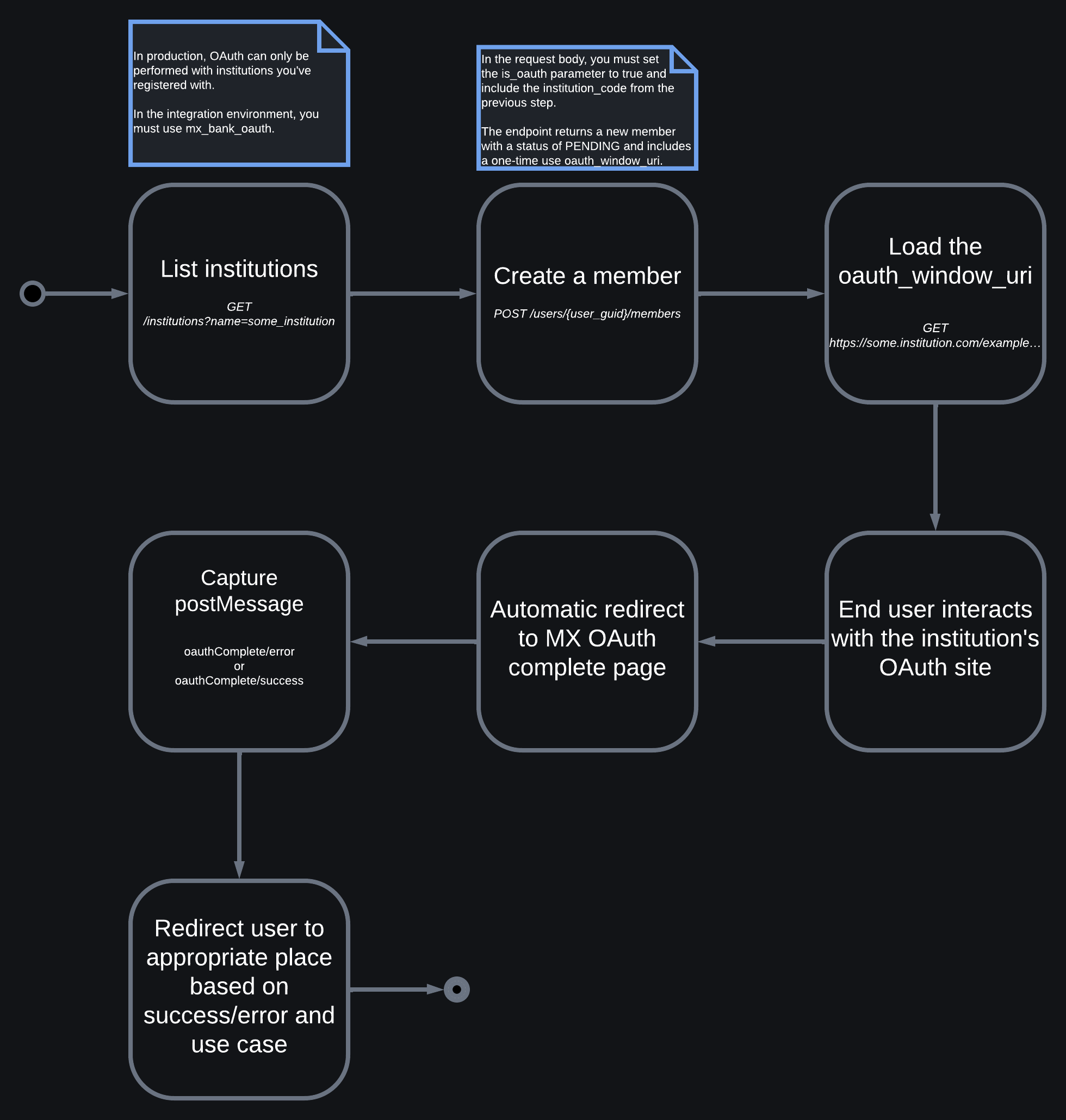 Now we'll need to create an OAuth member, which you can do by setting the following: `"is_oauth": true`.
Also, we recommend that you always include a unique `id` when creating any resource on the Platform API so you can easily sync between your systems and ours.
Standard aggregation (of account and transaction data) will start after a successful OAuth connection. This can be disabled with the [`skip_aggregation`](/api-reference/platform-api/reference/members) parameter.
`Endpoint: POST /users/{user_guid}/members`
```shell Request theme={null}
curl -i -X POST 'https://int-api.mx.com/users/USR-11141024-90b3-1bce-cac9-c06ced52ab4c/members' \
-u 'client_id:api_key' \
-H 'Accept: application/vnd.mx.api.v2+json' \
-H 'Content-Type: application/json' \
-d '{
"member": {
"institution_code": "mx_bank_oauth",
"id": "unique_id",
"is_oauth": true
}
}'
```
```json Response theme={null}
{
"member": {
"aggregated_at": null,
"connection_status": "PENDING",
"guid": "MBR-84ca0882-ad6c-4f10-817f-c8c0de7424fa",
"id": "unique_id",
"institution_code": "mx_bank_oauth",
"is_being_aggregated": false,
"is_managed_by_user": true,
"is_oauth": true,
"metadata": "Additional information",
"name": "MX Bank (Oauth)",
"oauth_window_uri": "https://mxbank.mx.com/oauth/authorize?client_id=b8OikQ4Ep3NuSUrQ13DdvFuwpNx-qqoAsJDVAQCyLkQ&redirect_uri=https%3A%2F%2Fint-app.moneydesktop.com%2Foauth%2Fredirect_from&response_type=code&scope=openid&state=d745bd4ee6f0f9c184757f574bcc2df2",
"successfully_aggregated_at": null,
"user_guid": "USR-11141024-90b3-1bce-cac9-c06ced52ab4c",
"user_id": "unique_user_id",
}
}
```
**WARNING**
**Do not set `"oauth_referral_source": "APP"` in browser implementations** — this will break OAuth flows. In typical browser environments, you can simply omit that configuration option, or set it to `"BROWSER"` explicitly.
Now that you have the `oauth_window_uri` from the last step, load it for the end user.
`oauth_window_uri`s are **one-time use**. Don't hard code an expected URI into your application.
Don't prepend the `https://` protocol to the URI string, as MX includes this.
This is where the user will interact with the institution's OAuth page and determine what data will be shared with MX and, therefore, with you.
This process involves a redirect to an MX webpage whose function is to give the end user information about the end state of the OAuth process, and to deliver important success or failure postMessages.
You must capture these postMessages, which will be one of the following:
### OAuth Complete Error PostMessage
Triggered when the OAuth process has completed in an error state. The `oauthComplete/error` message will be sent from the OAuth UI, and is used in API implementations.
**Error Reasons**
| Value | Definition |
| :--------------- | :---------------------------------------------------------------- |
| `CANCELLED` | The user cancelled or exited the OAuth process. |
| `DENIED` | The user was unable to authenticate with the provider. |
| `IMPEDED` | User action is required at the provider's website. |
| `PROVIDER_ERROR` | An unknown error occurred at the provider. |
| `SERVER_ERROR` | An unknown error occurred. |
| `SESSION_ERROR` | The user was unable to reauthenticate using the existing session. |
```json JSON theme={null}
{
"metadata": {
"error_reason":"CANCELLED",
"member_guid": "MBR-2344"
},
"mx": true,
"type": "oauthComplete/error"
}
```
### OAuth Complete Success PostMessage
Triggers when the OAuth process has completed in a successful state.
```json JSON theme={null}
{
"metadata": {
"member_guid": "MBR-2344"
},
"mx": true,
"type": "oauthComplete/success"
}
```
## The process is complete
The OAuth process is now in an end state (either success or error) and the OAuth window can be closed and the user can be redirected where they need to go based on your use case.
Now we'll need to create an OAuth member, which you can do by setting the following: `"is_oauth": true`.
Also, we recommend that you always include a unique `id` when creating any resource on the Platform API so you can easily sync between your systems and ours.
Standard aggregation (of account and transaction data) will start after a successful OAuth connection. This can be disabled with the [`skip_aggregation`](/api-reference/platform-api/reference/members) parameter.
`Endpoint: POST /users/{user_guid}/members`
```shell Request theme={null}
curl -i -X POST 'https://int-api.mx.com/users/USR-11141024-90b3-1bce-cac9-c06ced52ab4c/members' \
-u 'client_id:api_key' \
-H 'Accept: application/vnd.mx.api.v2+json' \
-H 'Content-Type: application/json' \
-d '{
"member": {
"institution_code": "mx_bank_oauth",
"id": "unique_id",
"is_oauth": true
}
}'
```
```json Response theme={null}
{
"member": {
"aggregated_at": null,
"connection_status": "PENDING",
"guid": "MBR-84ca0882-ad6c-4f10-817f-c8c0de7424fa",
"id": "unique_id",
"institution_code": "mx_bank_oauth",
"is_being_aggregated": false,
"is_managed_by_user": true,
"is_oauth": true,
"metadata": "Additional information",
"name": "MX Bank (Oauth)",
"oauth_window_uri": "https://mxbank.mx.com/oauth/authorize?client_id=b8OikQ4Ep3NuSUrQ13DdvFuwpNx-qqoAsJDVAQCyLkQ&redirect_uri=https%3A%2F%2Fint-app.moneydesktop.com%2Foauth%2Fredirect_from&response_type=code&scope=openid&state=d745bd4ee6f0f9c184757f574bcc2df2",
"successfully_aggregated_at": null,
"user_guid": "USR-11141024-90b3-1bce-cac9-c06ced52ab4c",
"user_id": "unique_user_id",
}
}
```
**WARNING**
**Do not set `"oauth_referral_source": "APP"` in browser implementations** — this will break OAuth flows. In typical browser environments, you can simply omit that configuration option, or set it to `"BROWSER"` explicitly.
Now that you have the `oauth_window_uri` from the last step, load it for the end user.
`oauth_window_uri`s are **one-time use**. Don't hard code an expected URI into your application.
Don't prepend the `https://` protocol to the URI string, as MX includes this.
This is where the user will interact with the institution's OAuth page and determine what data will be shared with MX and, therefore, with you.
This process involves a redirect to an MX webpage whose function is to give the end user information about the end state of the OAuth process, and to deliver important success or failure postMessages.
You must capture these postMessages, which will be one of the following:
### OAuth Complete Error PostMessage
Triggered when the OAuth process has completed in an error state. The `oauthComplete/error` message will be sent from the OAuth UI, and is used in API implementations.
**Error Reasons**
| Value | Definition |
| :--------------- | :---------------------------------------------------------------- |
| `CANCELLED` | The user cancelled or exited the OAuth process. |
| `DENIED` | The user was unable to authenticate with the provider. |
| `IMPEDED` | User action is required at the provider's website. |
| `PROVIDER_ERROR` | An unknown error occurred at the provider. |
| `SERVER_ERROR` | An unknown error occurred. |
| `SESSION_ERROR` | The user was unable to reauthenticate using the existing session. |
```json JSON theme={null}
{
"metadata": {
"error_reason":"CANCELLED",
"member_guid": "MBR-2344"
},
"mx": true,
"type": "oauthComplete/error"
}
```
### OAuth Complete Success PostMessage
Triggers when the OAuth process has completed in a successful state.
```json JSON theme={null}
{
"metadata": {
"member_guid": "MBR-2344"
},
"mx": true,
"type": "oauthComplete/success"
}
```
## The process is complete
The OAuth process is now in an end state (either success or error) and the OAuth window can be closed and the user can be redirected where they need to go based on your use case.