

member must be created using credentials specific to the financial institution in question. These are typically a username and password, but may be an account number and password or some other form of credential.
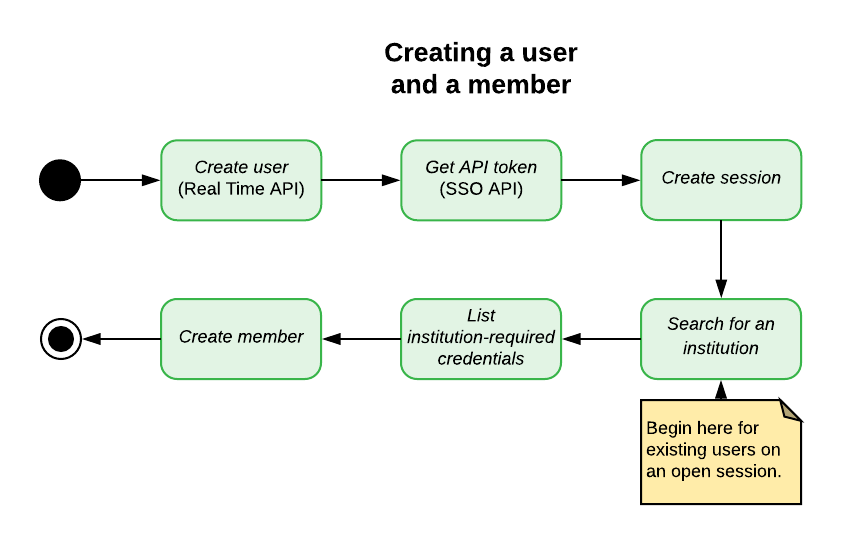
The diagram below outlines the process, including creating a user and opening a Nexus session. For existing users on an open session, skip the earlier steps and begin with searching for an institution.
Search for an Institution
Use the search institutions endpoint to find a specificinstitution on the MX platform.
Request the Institution’s Required Credentials
Eachinstitution has a set of required credentials that are necessary to authenticate a member connecting to it. Partners should use the institution-required credentials endpoint to get the correct list.
There are many different types of institution-required credentials. These credential types map to an HTML input element.
INFOTo clarify terms related to credentials: “institution-required credentials” are the authentication questions required by a specific institution such as a login and password; “member credentials” are the answers to those questions which are stored on the member at the time of creation or when the member is updated; “MFA credentials”/“MFA challenges” are the questions asked during multi-factor authentication which are answered through the resume endpoint.
Create a New Member
Calling the create member endpoint with the correct institution-required credentials provided by the end user will create amember and store the provided credentials in one step. Partners should not create a member without member credentials.
A successful create member request will automatically start aggregation for the newly created member. You can prevent this by using the skip_aggregation flag with your request.
INFOThe MX platform does not allow duplicate members. Specifically, a create member request will fail if the provided member credentials are identical to those already in use by another member connecting the same user to the same institution.Updating an existing member’s credentials can also return a duplicate member error if the user already has another member connected to the same institution using the same credentials as provided in the update.