

connection_status, answering MFA challenges if required, and then resuming the aggregation.
Aggregation may be initiated either automatically or manually.
Automatic aggregation occurs in three situations, and can be prevented by using the skip_aggregation flag when making the relevant call to the API:
- When a new session is created, all members on the user will automatically be aggregated;
- When a new member is created, the new member will be aggregated;
- When a member’s credentials are updated using the update member endpoint, the member will be aggregated. Updates which do not involve member credentials won’t kick off an automatic aggregation.
- Call the aggregate member endpoint (refresh member is an alias).
- Call the aggregate all members endpoint (refresh all members is an alias).
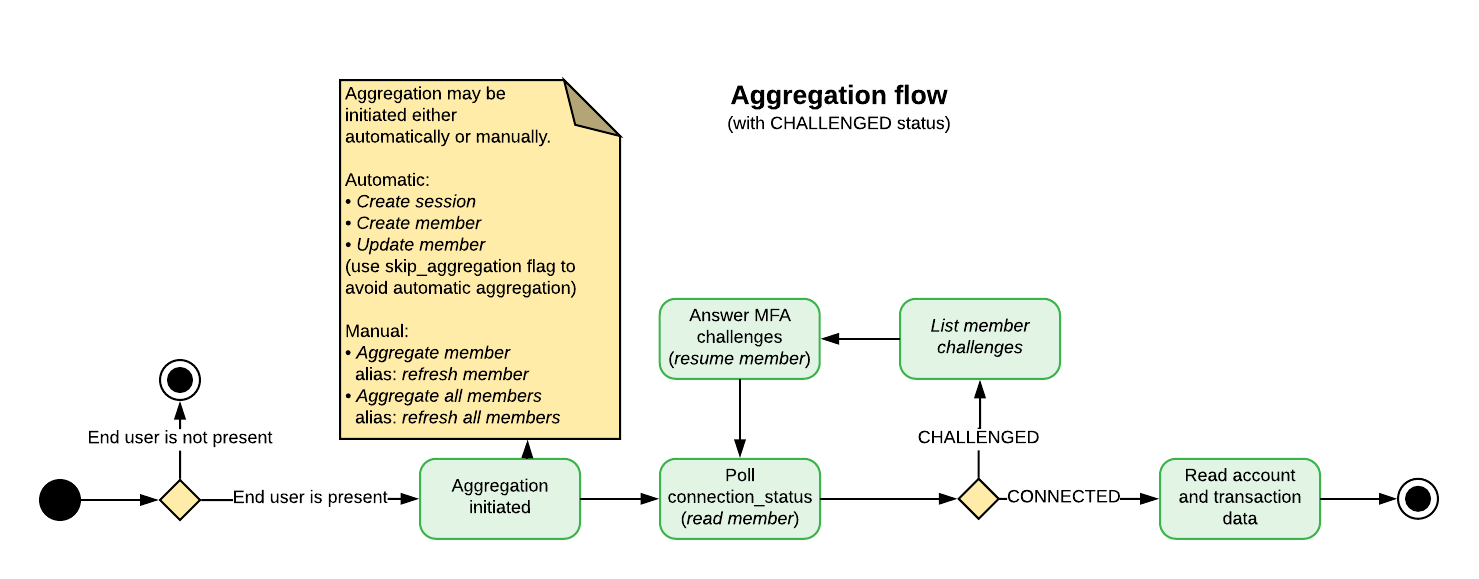
Dealing with MFA
Some institutions require authentication to be done in multiple steps; this process is called multi-factor authentication (MFA). Basically, it is a back and forth dialogue between the end user, the partner’s application, and the institution. After the initial credentials are provided, the institution can either grant access or present an MFA challenge.INFOMFA is controlled by the institution’s security settings and not by MX. MFA can be encountered at each step in the aggregation process.
CHALLENGED state even if aggregation on that member has succeeded in the past. Financial institutions will typically have multiple MFA questions and may ask a new question in future aggregations.
A single aggregation may also enter multiple CHALLENGED states. A typical scenario for this is when a list of options is presented along with a question such as, “Where should we send an authentication token?” The end user should be prompted for the answer and the answer provided to MX, which will send it to the data provider. The aggregation will move to a RESUMED state, but then will go back into a CHALLENGED state. This time, the end user should be prompted to enter the access token. If the MFA challenge is answered successfully, the aggregation will typically proceed to an end state.
MFA can occur at any time, so even if authentication has been successful in the past, the institution may require an end user to authenticate again.
More details on how to deal with multi-factor authentication are below.
The connection_status Field
The connection_status field appears on all member resources and indicates the current state of aggregation for that particular member. Partners can poll a particular member using the read member endpoint to follow changes in the connection_status throughout an aggregation. Partners can use the list members endpoint to get a list of connection statuses for all members.
The connection_status should be used in conjunction with several other member fields to determine future actions, including connection_status_message, aggregated_at, is_being_aggregated, and successfully_aggregated_at. Definitions for these fields appear at the end of this section. Definitions for all member fields are available here.
For example, when the connection_status is CONNECTED and the is_being_aggergated field is false, the aggregation is complete and data for accounts and transactions can be pulled.
When the status is CHALLENGED, an MFA challenge has been issued, requiring a separate workflow and end-user input.
The statuses CREATED, UPDATED, DELAYED, and RESUMED represent transient states for different points in the aggregation process and generally do not require a specific action or end-user input. They may, however, require continued polling until an end state is reached.
The statuses PREVENTED, DENIED, IMPEDED, IMPAIRED, REJECTED, EXPIRED, LOCKED, IMPORTED, DISABLED, DISCONTINUED, and CLOSED, represent end states that will require a new aggregation, and possibly end-user input for future success.
Dealing With a CHALLENGED Status
- List the member challenges
CHALLENGED, the aggregation will require MFA credentials derived from end-user input.
Partners must make a request to the list member challenges endpoint to obtain the challenges to be presented to the end user.
- Resume the Aggregation
CHALLENGED member, a request to the resume aggregation endpoint will add these MFA credentials to the member and automatically resume the aggregation process. It will run until it either completes in an end state or enters into a state that requires action, as described above. It is not uncommon for an aggregation to be CHALLENGED more than once.
It is important to remember that using the resume aggregation endpoint does not begin a new aggregation. It simply resumes an aggregation that is already in progress which has been interrupted by MFA.
Dealing With a REJECTED Status
A REJECTED status means that an MFA challenge has been answered incorrectly. This means that the existing aggregation has reached an end state; a new aggregation must be initiated which follows the same process outlined above.
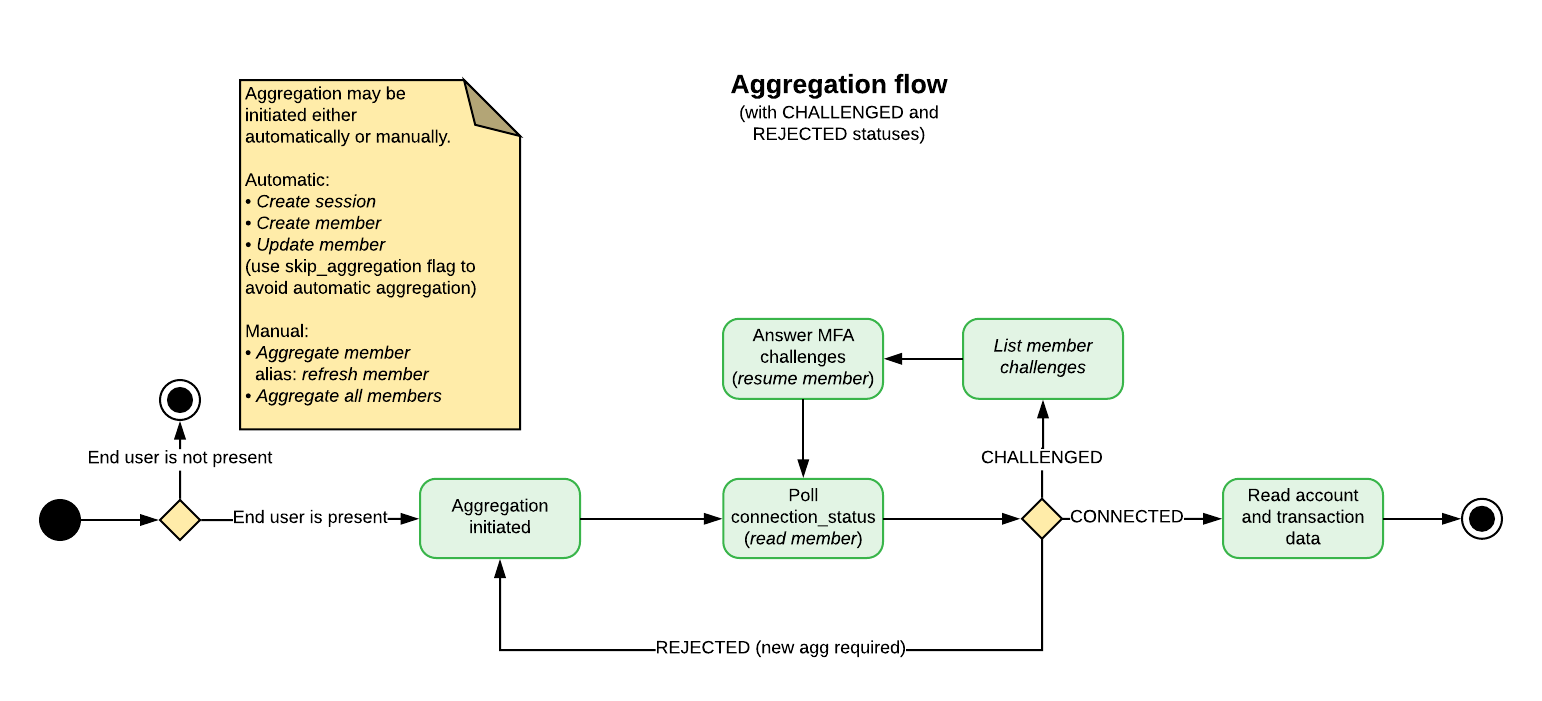
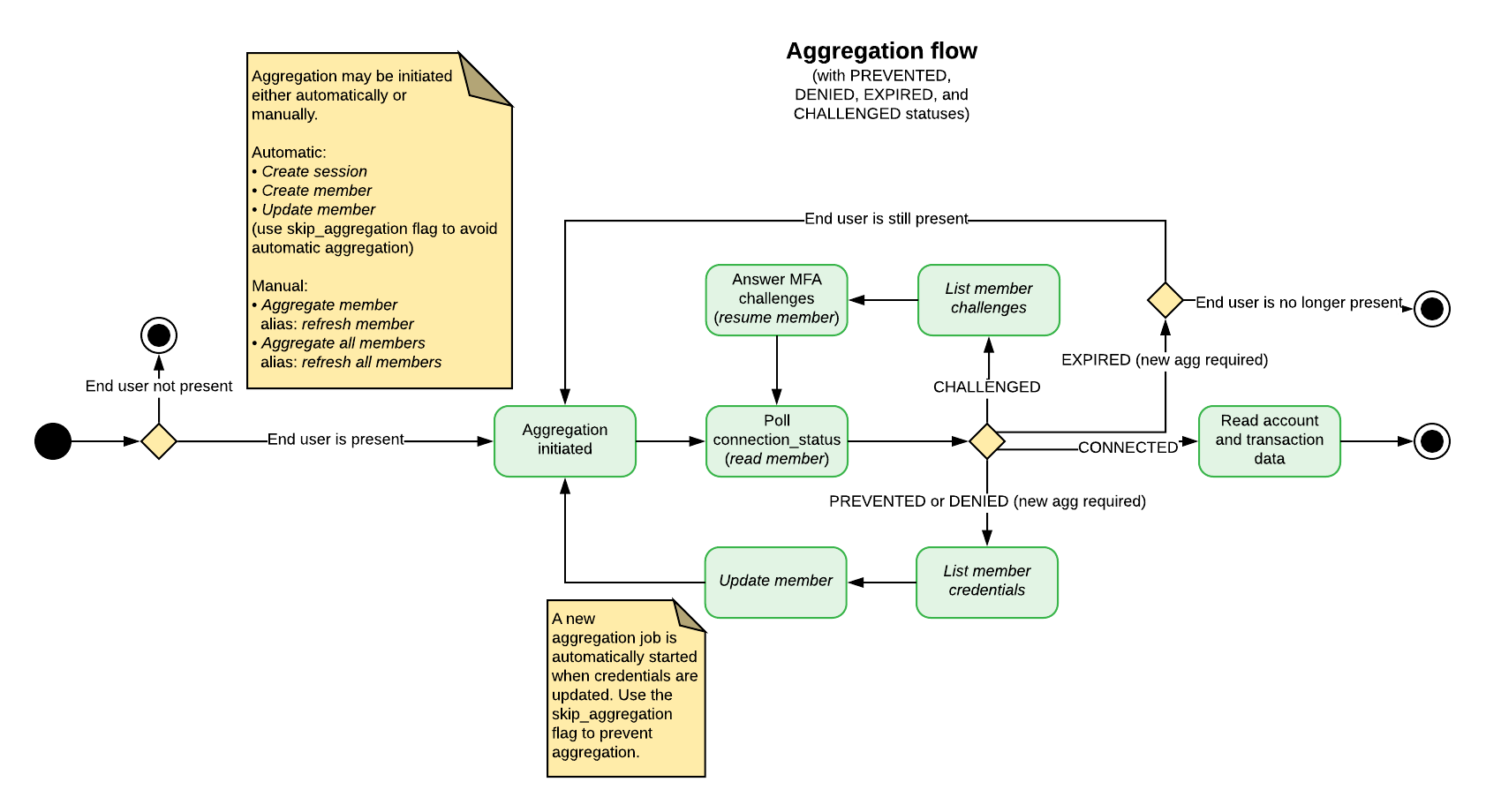
Dealing With a DENIED, PREVENTED, or EXPIRED Status
If a member has aPREVENTED or a DENIED status, it means the authentication credentials are invalid; the end user must provide new credentials, and the member must be updated, and a new aggregation must be initiated.
A request to the list member credentials endpoint will return a list of the authentication credentials required for that member; corresponding input should be gathered from the end user, and that input should be passed to the update member endpoint.
Updating a member’s credentials will start an automatic aggregation. If you wish to prevent this (for instance, if you are trying to identify or verify a member), pass the skip_aggregation flag with your request.
Request the Member’s Required Credentials
Partners should always request a list of the member’s required authentication credentials before prompting the end user to update them. In addition, when updating a member’s credentials, partners must request the required credentials for that particular member. Partners should not assume that the member has the same required credentials that would be necessary to create a new member on the same institution. MX has many data providers; two members belonging to the same institution but using different data providers may have a different set of required credentials.Update the Member
Partners should always use the update member endpoint to provide new member credentials when the current ones are invalid. Do not delete the member and create it again. Deleting a member will also delete the accumulated transaction history associated with it, and the new member will not have access to the lost history. It may also cause errors; some of MX’s data providers consider it a duplicate connection when a new member is created too quickly after the previous member was deleted. Always update the existing member rather than creating a new one.INFOAn update member request will fail if the authentication credentials provided are identical to those already in use by another member connecting the same user to the same institution. This would create a duplicate member, which is not allowed on the MX platform.
Dealing With an EXPIRED Status
If the end user is not present to answer MFA questions, a member in a CHALLENGED state will eventually time out, and the status will land on EXPIRED. In this case, the authentication credentials are valid but a new aggregation must be started, and additional MFA challenges must be answered if the aggregation is to succeed. Partners should not ask the end user to re-enter their authentication credentials for this member. Instead, a new aggregation should be started the next time the end user is present so they can answer any MFA challenges.When to Use the skip_aggregation Flag
The skip_aggregation flag may be used when you wish to avoid the automatic aggregation that is kicked off with certain API requests.
Automatic aggregation occurs in three situations.
- When a new session is created, all members on the user will automatically be aggregated;
- When a new member is created, the new member will be aggregated;
- When a member’s credentials are updated using the update member endpoint, the member will be aggregated. Updates which do not involve member credentials won’t kick off an automatic aggregation.