

- Overview
The Connections Widget lets end users manage their connected institutions and accounts.This widget can be accessed when the user selects Manage Connections from the Money Dashboard.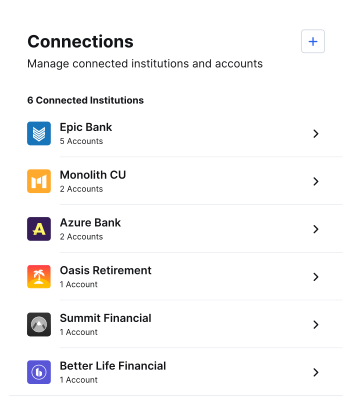
Key Features
- View connected institutions and accounts within those institutions
- Connect accounts and resolve connection issues
- Disconnect an institution
- Hide an account from use in other widgets
- Merge accounts that show up twice
- Mark an account as closed
Filter Connections
If you’re using theuse_cases parameter, you can set the widget to only show connections (members) with the use_cases you set when requesting the widget URL.
To do this, set the:
connections_use_case_filterparameter totrue.use_casesparameter toPFMand/orMONEY_MOVEMENT, depending on what connections you want to show in the widget.
For more info on the
use_cases parameter, see one of the following guides depending on the API you’re using:Example 1
In this example using the Platform API, the Connections Widget will only show connections (members) that havePFM set as a use case.
A connection (member) could have its use_cases parameter set to ["PFM", "MONEY_MOVEMENT"] and still display in the widget, since the member contains one of the use cases defined in the request.
Example 2
In this example using the Platform API, the Connections Widget will only show connections (members) that havePFM or MONEY_MOVEMENT set as a use case.
A connection (member) could have its use_cases parameter set to only ["MONEY_MOVEMENT"] and still display in the widget, since the member contains one of the use cases defined in the request.