

- Overview
- Empty State
The Debts Widget lets end users to see all their debts in one place and create an expedited payoff plan.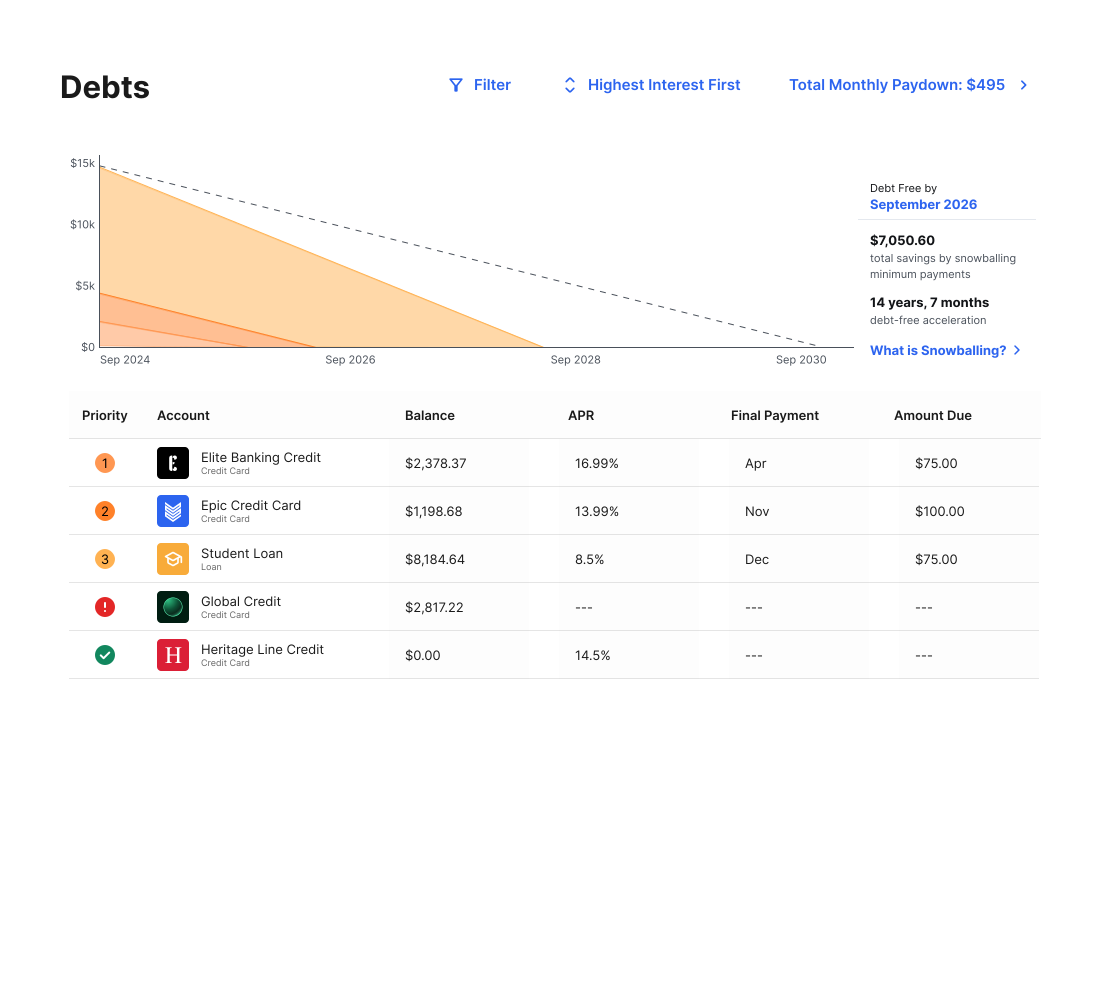

Key Features
- View debts sorted by priority
- For each account, see the balance, APR, final payment, and amount due
- Select a debt payoff strategy
- See and edit total monthly paydown
- Filter the accounts shown
Debt Payoff Strategies
Users can select one of the following debt payoff strategies:- Fastest payoff first: Debts are ordered by which debt you will pay off soonest, based on balance, APR, and minimum payment. This ordering is considered the standard snowball method.
- Highest interest first: Debts are ordered from your highest APR to the lowest APR. This ordering is often referred to as the “avalanche method”; it can save you more money over the life of the debt.
- Lowest balance first: Debts are ordered by balance from lowest to highest.
- Highest balance first: Debts are ordered by balance from highest to lowest.
Change Debt Priorities
- In Debts, select the Fastest Payoff First dropdown menu.
- Select one of the four available options. The chart and all associated calculations will automatically update.
Hide an Account From Debts
- In Debts, select an account from the list under the detail window.
- Select the three dots in the top right.
- Select Hide From Debts.
- Select the hidden account at the bottom of the debts list.
- Select Include Account.
Simulate Extra Payments Towards Debts
- In Debts, select the Total Monthly Paydown dropdown.
- Enter an additional amount in the Extra Payment Toward Debt box.