

Personal Finance Management
Mark as Paid
We’ve added the capability to mark transactions as Paid in our Recurring Transactions Widget.Connect Widget
Web Widget SDK
We’ve released a new Web Widget SDK for embedding the Connect Widget.Connect Widget
React Native SDK
We’ve released a new React Native SDK for embedding the Connect Widget in iOS and Android apps. The new SDK improves OAuth conversion rates by opening redirects within the app and simplifies integration compared to the previous SDK or embedding via a WebView directly.AudiencesPersonal Finance Management
Audiences | Sync Audiences
You can sync your audiences to Blueshift for targeted campaigns and customer engagement. Once configured, your audiences sync daily.FinStrong Widget
We’ve added our FinStrong Widget to the Money Dashboard Widget.Trends Widget
We’ve updated our Trends Widget to have a simpler, cleaner design.Personal Finance Management
Investments Widget
We’ve added our Investments Widget to the Money Dashboard Widget and updated it with a new style.Mobile BankingFinancial Insights
Mobile App Redesign
We’ve redesigned our Mobile Banking experience. The new experience focuses on user-centric design and delivers significant improvements in usability, satisfaction, and engagement.Insights User Feedback
MX has enhanced the User Feedback insight. Previously limited to a single rating and open comment, the updated feedback survey now includes three questions. This update provides a clearer view of user sentiment and product performance while maintaining the same in-feed, interactable experience.AudiencesFinancial Insights
Audiences | Marketing Opt-Out List
In Audiences, you can import a single list of users who have opted-out of promotional communications to exclude them from new messages.See Marketing Opt-Out List.Custom Insights
MX now offers custom-made Financial Insights. We can help you create, configure, and deploy your own insights to support your unique business goals. You can define language and CTAs and view performance metrics for the insights you create. Learn more about Custom Insights.Personal Finance Management
Micro Insights Widget Updates
We’ve updated our Micro Insights Widget with optional style features.- An updated carousel which shows peeks of the next card to indicate continuity
- Redesigned dots below the cards to indicate position
- New theming capabilities to allow your institution branding to reflect in the Micro Insights Widget
Customer AnalyticsPersonal Finance ManagementData Access
Recurring Transactions Widget
We’ve updated our Recurring Transactions widget with a new style.Customer Analytics Audience Assistant
Create an audience using natural language with Audience Assistant.Audience Assistant reads your plain-language request, translates it to the underlying Customer Analytics filters, and shows the human‑readable conditions that define the resulting audience.Data Access API Weekly Stats Report
We’ve added a new premium feature to Data Access for Channel Partners and Data Providers. You can add up to 5 email addresses to receive a weekly report (scheduled Sunday 12 a.m. UTC) about API stats such as total requests, overall availability, an error summary, stats per endpoint, and more.To set this up, visit Performance Monitoring, then select Manage Settings.Financial InsightsPersonal Finance Management
New Widget Sizes
We’ve released a micro version of our Trends Widget, Net Worth Widget, and Recurring Transactions Widget. We also released a Mini Goals Widget.Financial Insights Notifications
Users can now get timely notifications for the Financial Insights that matter to them the most. Notifications are delivered through any of our available channels (in-app, SMS, push notifications, or email). Reach out your MX representative to get them set up.Supported Systems
MX only supports devices that have received security updates in the last 6 months.PFM Locales
You can now set the language for the Money Dashboard widget. Do this in one of three ways: contact your MX representative to set the locale globally or set your integration to respect the user’s browser settings, or pass thelocale parameter through your Widget URL request.Insights Retention
We’ve updated our platform to only display the last 90 days of Financial Insights (previously 180 days) to improve platform stability and provide quicker loading and response times.Actionable Integration WidgetData AccessPersonal Finance ManagementPlatform API
New Actionable Integration Widget
The Actionable Integration widget is designed to unlock existing and many future functionalities without requiring you to enroll in Insights. Now you can call directly to our integration of direct deposit SDKs (as well as future SDK integrations) and display it wherever you need to.Data Access Improvements
Data Access has improved real-time visibility into consumer data sharing activity.We’ve enhanced the ability to disable third party applications in a way that minimizes connectivity disruptions for end-users and aligns with 1033’s requirements for revoking an app’s access.We’ve also improved webhook notifications to enable Data Providers to receive:- First time consent to share data with a third party
- Renewed consent to share data with a third party
- Expiring consent to share data to a third party
- Revoked consent to share data to a third party
- Modified consent to share data to a third party
Updated PFM buttons
We’ve added the “Add Accounts” button to the Accounts widget header and the Money Dashboard welcome bar to make it easier to connect your external accounts.New Notification
We’ve created a new version of the Large Deposit notification that will only trigger on POSTED transactions. You can choose to enable this version or the original version (triggers when the transaction is first seen, regardless of status) based on your desired user experience.Updated MX IP Address Ranges
Added new IP range to be utilized at MX Data Center and Cloud locations. See: MX IP Address Ranges.Platform API Version documentation
With our Unified Product Ordering release in March, we introduced Platform API versionv20250224 using a beta header for passing the API version. Now, we’re releasing full documentation for v20250224 and updates to our versioning guide. This update includes support for MX’s new version header for Unified Product Ordering:Customer AnalyticsPersonal Finance ManagementFinancial Insights
Customer Analytics Campaign ROI
Customer Analytics has a new home page that now allows you to easily track campaign ROI metrics. ROI metrics include: deposits, direct deposit, aggregation rate, products per user, loan balance, and digital adoption.Looking for metrics formerly on the home page? Some metrics have moved. Use the Digital engagement & aggregation dashboard to find total platform users, adoption and engagement rates, number of accounts over time, aggregation trend over time, and login rate. Use the External relationships dashboard to view the number of customers with external accounts, top 15 competitors, and top 20 aggregated institutions.The Customer Analytics User Guide has more information.Feedback Survey
We’ve added a Give Feedback button to the side of every page. Now, you can rate a page as helpful or unhelpful and share your comments.Money Dashboard Updates
The Recurring Transactions Widget now allows aTwice a Month recurrence type.Insights Updates
We’ve updated elements of our Insights UI to address various accessibility standards and needs.You can now use a Messaging setting to flag a campaign as a “direct deposit” campaign, which directs the CTA button to open the Insights widget with a direct deposit SDK overlaid.Personal Finance ManagementCustomer AnalyticsPlatform APICustomer Analytics
Money Dashboard Updates
You can now customize your Money Dashboard widget’s primary color and choose light or dark mode.The Settings widget has a new Help tab which displays FAQs and the Request Support button.New Spend-to-Income Dashboard
Customer Analytics now has a dedicated dashboard for the Spend-to-Income calculation, which delivers crucial insights for your products and services.This dash unlocks the full story with aggregated and discovered account data through Customer Analytics, helping you better assist your customers in the following groups:- High spend-to-income ratio. These customers may benefit from increased engagement with budgeting tools, debt consolidation services, or financial health consultations.
- Low spend-to-income ratio. These customers may find value in high-yield savings products or investment products and services.
Priority Data
When requesting products using Platform API version 20250224, you can optionally retrieve priority data before all requested data has aggregated. This helps:- Reduce user drop-off during the connection flow
- Power time-sensitive workflows such as account verification or balance display
Documentation site navigation improvements
We’re making incremental improvements to our navigation to help you find what you need. Our top navigation now has an API Reference dropdown to help you get to documentation with fewer clicks. Plus, we’ve streamlined product documentation into product areas with new left sidebars. There’s less scrolling to get where you need to go.Customer Analytics UX enhancements
Customer Analytics has launched significant UX enhancements to address several pain points identified through user interviews, client feedback, and user sessions.-
All dashboards are now organized under two main navigation categories:
- Segment Analytics: This category includes dashboards designed for audience creation. These dashboards are tagged to indicate their potential use cases.
- Product Performance: This category includes dashboards not intended for audience creation. These dashboards are for general analysis and discovery about money movement, your customers, your institution, etc.
-
Dashboard changes:
- All Opportunities dashboards (credit cards, mortgage, auto loans, wealth) have been consolidated into a single External Relationships dashboard.
- The Savings attrition and Checking attrition dashboards are merged into one Account Churn dashboard.
-
Renamed dashboards:
- Lookalike audiences → Current customer snapshot
- Retail audience builder → Pre-built audiences
Personal Finance ManagementData Access
Money Dashboard Widget
The Money Dashboard Widget is our refreshed Master Widget. The new layout has a left navigation bar which groups our other widgets into high-level categories of “Save,” “Spend,” “Borrow,” and “Plan.” The Dashboard page is a collection of mini widgets you can configure and display to your users. The Money Dashboard Widget can also display Customer Analytics banner campaigns.Connections Widget Use Case Filter
If you’re using theuse_cases parameter, you can set the Connections Widget to only show connections (members) with the use_cases you set when requesting the widget URL.For API examples, see Filter Connections.For more info on the use_cases parameter, see one of the following guides depending on the API you’re using:Data Access Webhooks
Now, in the Data Access portal, you may create, edit, disable (pause), or delete your webhook endpoints to receive notifications when your customers update consent.Messaging Micro and Mini Widgets
Our Messaging feature now has the ability to send Insights using micro or mini widgets. When creating an Insight using the Messaging feature, you may choose regular, micro, or mini size for the Insight widget.Data Access Statements
We now have support for the FDX Statements API. Use these endpoints to provide account statements for users.Updated Settings Widget
Our Settings Widget has a new look and is the new home for the Help content.Financial InsightsPlatform API
Unified Product Ordering
If you’re using the Platform API, you can include a version header for version20250224 to aggregate data from multiple products in a single API call.New Insights
We’ve added a Discovered Accounts Insight that will identify discovered accounts from the user’s held account data and suggests they connect the discovered account.Connect Widget
ISO Country Code
We’ve added support for country-specific institution filtering in the Connect Widget and Platform API. This enhancement allows you to control which financial institutions are available in the widget or API based on country codes, improving user experience and conversion rates. With this, you’ll have:- More control over which institutions end users can connect to.
- Fewer issues related to international transfers in payment use cases.
- A more seamless experience for users in specific countries.
Recurring Transactions API
We’ve added a group of new transactions endpoints that empower you to deliver insights into recurring financial obligations (bills, subscriptions) and income streams. By identifying patterns in transaction data, users can gain clarity on cash flow, enabling proactive budgeting and personalized financial experiences.See our Recurring Transactions guide for requirements, endpoints, and more.Connect WidgetFinancial Insights
Connect Widget
Member Use Cases
If you’ve implemented the Connect Widget to support PFM and money movement use cases, you can use theuse_cases field on applicable requests to ensure:- Each member is associated with a specific use case.
- Our PFM and Insights products reflect data only for members with the PFM use case.
- Members with
"use_cases": ["MONEY_MOVEMENT"]do not aggregate transaction data.
Callback Header
If you set theX-CALLBACK-PAYLOAD header in the widget URL request, this will be returned in the metadata for all Widget Events.Financial Insights
The Set Up Direct Deposit insight prompts users without an active direct deposit to set one up.Platform API
TheX-CALLBACK-PAYLOAD header will appear in the Member and Member Data Updated webhooks if it was set in the Create/Update Member or Aggregate/Verify Member respectively, allowing you to trace user interactions and workflows initiated externally and internally in the MX Platform.Connect WidgetFinancial InsightsInvestment Data
Connect Widget
We’ve enhanced the institution connection screen to better highlight a successful connection:- Replaced the institution’s logo with a filled checkbox icon.
- Added a confetti animation to celebrate successful connections.
- Made a few other minor visual improvements for a better user experience.
Financial Insights
Users can now unhide insights they’ve hidden.We’ve also added a new insight, Direct Deposit Switch, that identifies direct deposits in aggregated accounts and prompts the user to switch their direct deposit to their held account. This insight encourages users to take action on their finances by leveraging direct deposit partners to streamline the switching process.Connectivity
As MX continues our transition to Google Cloud, you may soon notice an improvement in the completeness of our data providing future benefits in overall data quality, processing efficiency, and ultimately improving insights derived from the data.Connect Widget
Navbar
We added a navbar to the Connect Widget that contains a back button to direct end users to the previous UI. This button is present on most screens. Examples of screens that don’t have the button include the connecting screen, connected screens, and MFA screens.Member Use Cases
If you’ve implemented the Connect Widget to support PFM and money movement use cases, you can use theuse_cases field on applicable requests to ensure:- Each
memberis associated with a specific use case. - Our PFM and Insights products reflect data only for members with the
PFMuse case. - Members with
"use_cases": ["MONEY_MOVEMENT"]do not aggregate transaction data.
Financial Insights
We added a Set Up Direct Deposit insight that detects held accounts that don’t have a direct deposit coming in and prompts the user to set it up.Investment Data
We launched our new Investment Data product that enhances and normalizes investment holdings data, providing actionable insights into your customers’ portfolios.See the docs for more info.Connect WidgetCustomer AnalyticsData AccessFinancial Insights
Connect Widget
The No Eligible Accounts screen is shown when there are no valid demand deposit (DDA) accounts on the member. We’ve consolidated the actions to one button instead of two and updated the error messaging so users can better understand their next steps. When the user clicks the Try again primary action button, the user is automatically navigated to our institution search screen. If you have search disabled, you can still listen for the Back to Search Widget Event to navigate the user to your desired experience.Customer Analytics
To help manage audiences used in Marketing Hub campaigns, we’ve launched an Audience Service API. You may retrieve a list of audiences, get a count of members of an audience, and download a list of available audiences in CSV or JSON formats.Data Access
For data provider implementations, Data Access now has an API to support building your own Consumer Consent Management Dashboard UI. Use this new API so that your consumers can manage which third parties have access to their data from your mobile app or online site.Financial Insights
We’ve added a new insight: Monthly Obligations Status. This insight informs users if they are on track/off track to pay off their monthly obligations.Mobile Banking
Mobile
We’ve added an integration with Paymentus (formerly Payveris) to enable end users to transfer money to/from an external account within our Mobile Banking app. End users are also able to view their historical transfers and modify their scheduled transfers from the mobile app.Client DashboardCustomer AnalyticsData AccessFinancial InsightsMobile Banking
Client Dashboard
You can now set up a SAML SSO login for our Client Dashboard. See our guide for more information.Connectivity
Effective May 28, 2024, the First Republic Bank (FRB) institution will no longer be available for new AGG and IAV connections. In addition, updated balances and transactions will be only available via a connection to Chase.- FRB has been acquired by Chase
- FRB Checking, Savings and CD accounts will be migrated to Chase over Memorial Day Weekend
- Loan accounts will be migrated to Chase later this year
- Any existing FRB connections will remain available, but any new transactions and updated balances will only be available through a connection to Chase.
- User’s old transactions from their FRB accounts will be on their Chase accounts.
- However, MX will only receive the previous six months of their transactions – anything beyond six months will not be ingested.
Customer Analytics
We’ve made the following improvements to the Primary Score page in Customer Analytics to more accurately reflect the financial engagement of your customers:- Enhanced primacy score calculation. The Primacy Score will now include an additional point for customers who have one or more Retail Loans.
- Export list additions. The Number Retail Loans field is now available for export. Additionally, we’ve surfaced the 30 Day Login Flag for export.
Data Access
For Data Providers, we’ve removed the following:- You can no longer delete or disable intermediaries from the Intermediaries page.
- You can no longer disable an app from the All Apps page.
Financial Insights
We’ve released a few new features with our Financial Insights product:- Insights API. You can use our API to create your own UI based on the data of our insights. See our API reference and Insights API guide for more details.
- Enhanced feedback menu in the Insights Widget. Users can now select predefined feedback from a list or write a comment.
- Monthly Emergency Fund Review insight. This new insight shows users a monthly summary of their emergency fund progress and encourages them to keep saving.
Mobile
We’ve released a few new features with our Mobile product:- Improved syncing messaging. When the user opens or logs into the app, the app will download the user’s account, transactions, personal finance management data, and sync/update all dashboard cards. This also removes the previous “Sync Bar” and replaces it with a “Syncing” note that can appear on any dashboard card and will help users better understand what in the app is syncing.
- Running balance totals on transactions. We added a running balance that can display within the Transactions tab of the Accounts Details for held accounts. This feature lets users see their balance for every transaction on an account. It sorts the transactions based on the posted date.
-
Pending transactions. Pending transactions are now clearly labeled as “PENDING” in the following locations:
- Transactions card on the Dashboard
- Transactions page
- Transactions tab after selecting an account
Connect WidgetCustomer AnalyticsFinancial InsightsData AccessMobile Banking
Connect Widget
We updated the UI/UX in the Connect Widget to provide searchable institutions in a four column tiled state. End users will find it easier to locate and identify their desired institution when connecting their accounts.Customer Analytics
We added the following reports:- Deposit Opportunity: Provides visibility into direct deposit users to help increase the number of primary financial services users and total amount of deposits on hand.
- Deposit Variance: Provides specific direction into where consumers have relationships to give you a better idea of where you can win business.
- Saving Account Attrition: Provides a view into the health of various saving account products over the last 12 months.
Data Access
We created an easy-to-navigate list of all your data intermediaries. This gives you the ability to drill down into each intermediary to view the steps for materials and contact info needed to onboard them. Find more information in our user guide.Financial Insights
We updated the Low Account Balance insight and added the Emergency Fund Withdrawal insight.Mobile
You can now see the following insights directly on your transactions in the mobile app:- Bill Amount Not Standard
- Subscription Price Increase
- Duplicate Payment
- Fee Detected
- Large Transactions
MicrodepositsConnect WidgetFinancial Insights
Microdeposits
We now automatically delete stale or inactive microdeposits after 90 days. Clients can request a report to confirm when and which microdeposits have been deleted. See Microdeposit Data Retention.Connect Widget
We added a new postMessage: Invalid Data. The postMessage is triggered when there are no valid demand deposit (DDA) accounts on the member. See PostMessage UI Events.Financial Insights
We’ve released our Micro Insights Widget! Smaller than the Mini Widget, the Micro Insights Widget still offers a carousel of insights that users can swipe through. This widget can be as small as 200px in width. Its size makes it the perfect widget to embed in multiple interaction points within your user experience to drive engagement. See the Micro Insights Widget.Customer AnalyticsData AccessClient DashboardFinancial Insights
Customer Analytics
- We’ve updated the navigation menu. If you’re a customer analytics client, you can now experience an improved flow to get you to your reports even faster. If you’re a Customer Analytics and a Data Access client, you can now find both of your products in the same navigation menu.
- We’ve continued to improve our user interface and design.
Data Access
- If you’re a Customer Analytics and a Data Access client, you can now find both of your products in the same navigation menu.
- We have launched the ability to file Zendesk support tickets from within the Customer Analytics and Data Access UIs. You can use this support feature to create a ticket with the MX support team, correspond with the team in comments and view status changes.
- There is a new “Onboarding” section where you can see all of the steps needed to set up your Data Access APIs and modify any settings as needed.
Connectivity
- We’ve expanded our coverage for several of our products including Account Owner Identification and Extended Transaction History, which will improve the Connectivity experience for these calls, and improve initial conversion for multi-product aggregation calls. Connect Widget
- In approximately 90 days, we will be changing the method in which clients handle disabling search in the Connect Widget. We will add a new postMessage: mx/connect/backToSearch. Clients that disable search in the Connect Widget will be required to listen for this postMessage to determine when clients have selected a button in the user experience that would lead them to the search for institution user flow. Upon the release of this feature, documentation will be provided.
Client Dashboard
Compliance Documents are now available in the Client Dashboard and all Community members have been migrated.Insights
We’ve added new insights to encourage healthy saving behavior:Connect WidgetFinancial InsightsData Access
Connectivity & APIs
- As of January 23, 2024, Chase will begin blocking OAuth authorization attempts for some web containers that have been classified as non-secure. We’ve provided some recommendations on web containers and their limitations with OAuth in our documentation.
- We’ve released another version of our Platform API. This version introduces Unix timestamps when adding date ranges as query parameters in our List Transactions endpoints. Visit our API Reference for more information.
Connect Widget
- Connect Widget now polls more frequently for OAuth status which contributed to a 3% increase in successful jobs during the OAuth flow
- Enhanced accessibility with improved screen reader compatibility and optimized keyboard navigation.
- Updated the new Verification webhook to include contextually relevant information for customers to leverage in their journeys and remove unnecessary information
Insights
We launched a few new insights:- Spending Plan Created Celebration
- Monthly Spending Plan Celebration
- Savings Milestone Emergency Fund
- Savings Account Deposit
Data Access
Added the ability for Data Providers to export consented data from the Logs table.Mobile BankingFinancial InsightsClient Dashboard
Mobile
- You can now introduce users to new features through a “What’s New” onboarding screen. This screen appears when the user first loads a new build version, assuming the user has viewed the app’s default onboarding. The modal contains pages that can be configured with header text, body text, and a custom image.
- New features can now have a custom banner added to display modals within the experience to introduce the user to the feature.
- Users are now informed about what data the app will have access to, and are asked to agree. They can also manage consent and third-party access. This feature uses functionality from our Data Access product.
- If you have a license with F5, you can now integrate F5 Shape Security into your mobile banking app build. This extends the F5 Bot Defense’s bot-protection capabilities and helps defend the app against bots, vulnerability scanners, content scraping, and other automated attack vectors.
- If you have a license with Fiserv, you can now integrate CardHub into your mobile banking app build. CardHub lets users secure their cards and card spending through features like approving or denying a recent transaction through push notifications, setting geographic boundaries for card spending, reporting a card as lost or stolen, and adding the card to a virtual wallet.
Financial Wellness
-
Spending Plan is now fully released for general availability! Spending Plan helps end users track their spending throughout the month. Users can set their income, select accounts for the widgets to use, track their recurring expenses, create and manage budgets, view any other spending, and see how much they have left to spend throughout the month. This release includes:
- Spending Plan Widget
- Mini Spending Plan Widget
- External availability via Platform API
- Spending Plan in Webhooks
- In the insights feed, users could previously hide an insight they no longer wanted to see only once. Users can now hide insights either one time or permanently. The user can also provide feedback on why they no longer want to see the insight they’ve chosen to hide. Clients who want this functionality will need to contact MX to enable it.
Insights
Dark mode can now be set in our insight’s widgets for all users or default to what each individual user set in their system settings.Client Dashboard
We added a verification webhook to the Client Dashboard. It triggers when new data is available after a successful verification. Visit the Dashboard to get started.Mobile BankingFinancial InsightsConnect WidgetMicrodepositsData AccessCustomer Analytics
Mobile Banking
- Enhanced the transactions filter to additionally let users filter transactions by amount, category, and merchant.
- We’ve added a new insights card that adds to the mobile app’s dashboard. This card lets the user swipe through their five most recent insights. The card also has a View all insights call-to-action that sends users to the full Insights feed.
Financial Insights
For the Weekend Spending Summary V2 insight, we enhanced the styling and updated what categories are considered non-essential. Additionally, the insight now shows examples of non-essential categories and how the transaction totals within the insight are calculated.Connectivity
OAuth
Added over 600 OAuth institutions for Jack Henry.Connect Widget
The Connections widget to include a “Close” button. This replaces the multiple back buttons that were previously displayed in the widget.Microdeposits
Added several new testing scenarios including successful verification, failed verification that cannot be retried, and failed verifications that can be retried.Data Access
Added a new section called API Overview. This simplifies the onboarding process for intermediaries by providing:- Attributes by use case: Displays a breakdown of which fields a data provider supports in each FDX use case.
- Test users: If you are a financial institution, add test user credentials that the intermediary can use to run consent flows.
- Example responses: Displays static responses that represent data returned by a financial institution for each endpoint.
Customer Analytics
We’ve added two new reports for all Customer Analytics clients:- Money Movement: Track the inflow of funds into an institution, where those funds land in customer accounts, and then flow out to other institutions and merchants
- Checking Attrition: Review the annual attrition rate for checking products for a financial institution. View the number of customers with checking products and identifies those customers who have closed or abandoned their checking accounts over the last year.
Financial InsightsPersonal Finance ManagementMobile BankingConnect Widget
All Products
MX will replace the font Proxima Nova with the font Inter as licensing costs and administrative issues associated with Proxima Nova have become prohibitively burdensome. Inter is a similar style font to Proxima Nova, so the visual change will be subtle. We expect most end-users won’t notice.This change will impact all products with MX-owned user interfaces.Personal Finance Management (formerly MoneyMap) Financial Insights Mobile Banking Connect MX Intelligence Client DashboardInter will become the new default option for UI’s that are themeable (Personal Finance Management, Financial Insights, Mobile Banking). If clients wish to use an alternative to Inter, they can do so by securing the proper licensing.This change carries with it some key benefits:- High legibility: Inter is designed with legibility in mind, making it highly readable across different sizes and resolutions. It offers excellent spacing and proportions, ensuring the text remains clear and accessible to users. While Proxima Nova is also legible, Inter’s focus on readability makes it a strong choice for user interfaces.
- Optimized for screen use: Inter is optimized for on-screen display, which is particularly important for digital products. It has been carefully crafted to maintain clarity and consistency on various devices, including desktops, laptops, tablets, and mobile screens. This ensures a smooth and visually pleasing experience for users.
- Wide range of weights and styles: Inter offers a broad range of weights and styles, allowing for greater typographic versatility. It includes nine weights with corresponding italics, making it suitable for various design purposes.
- Regular updates and improvements: Inter is actively maintained and updated by its creators, ensuring ongoing enhancements and bug fixes. This commitment to development helps to address any issues and refine the font over time.
Mobile Banking
The following copy has been updated to no longer assume the user has slow or no internet:- No internet now displays as Failed connection
- Slow internet now displays as Attempting connection
Connect Widget
We’ve improved our institution search functionality in the Connect Widget to load and return search results faster. Our recent updates have increased the accuracy and speed of our search results therefore clients that enable their end user’s to search for an institution can now expect a faster conversion from institution search to institution select.Additionally, search results can now display up to 25 institutions at a time and are paginated which allows end users to load an additional 25 institutions if necessary.Financial Insights
Financial Insights- Delete Insights Older than 6 Months
The Insights product previously stored user insights for up to one year. We are now in the process of changing that to store insights for a maximum of 6 months. This includes removing all existing insights that are older than 6 months. This change will not happen at once. We will instead delete a portion of the impacted insights daily, starting July 24th.This product update has been edited or updated to meet the requirements of our product roadmap. If you have any questions or concerns, reach out to your MX representative for more information._Mobile BankingPersonal Finance ManagementInstant Account VerificationAccount Owner Identification
Connectivity
For more information, check out our API Documentation.Instant Account Verification
We now indicate whether the account and routing number gathered during IAV has passed our validity check. If the passed_validation field that is returned with the account numbers is true, MX has indicated that the numbers are likely to be valid. This field is returned when requesting account numbers using our API endpoint.Account Owner Information
When retrieving account information, we can now return the first and last name as separate fields in addition to the full name. This feature must be enabled by MX, so clients can reach out to their representative for more information. If the feature is not enabled, the value for both the first name and last name is returned as null when retrieving account owner information.Mobile Banking
Our mobile app will now use our official MX Connect Widget to enable mobile users to connect their financial accounts. Previously, our mobile app used a different widget that enabled end-user connections. The new Connect Widget will automatically update with enhancements and changes that occur to the official Connect Widget. Clients can currently opt-in to this enhancement.Mobile & Personal Finance Management
Google’s Universal Analytics (UA) is currently our legacy analytics tool for Mobile and MoneyMap/PFM. Following Google’s announcement that they will discontinue UA on July 1, 2023, we will be migrating to Google Analytics 4 (GA4) over the coming weeks.Enabling GA4 for our Mobile app requires publishing a new build. MX will include this update in upcoming builds.To ensure a smooth transition, we’ll create the GA4 property and invite the email address of your choice to join as an admin. This will allow you to have full access and control in the new analytics platform.Mobile Banking
Mobile Banking
The following updates and improvements have been made to our Mobile service:- Support LivePerson Chat: The LivePerson chat feature has been updated to work seamlessly with iOS SDK version 6.10, and the Android SDK version 5.13.
- Phone number handling: Improvements were made to edge case phone number validation for broader handling.
- “Income” search: A bug was resolved for Search Bar questions on “Income.” There was a gap in search bar functionality for questions regarding income.
Connect Widget
Connect Widget
Wrong Account Type Returned UX
The following issue has been addressed: Users with a non-eligible account (non-DDAccount) were receiving a “successful” screen after going through the Connect flow, leading them to believe no further action needed to be taken.The new experience presents users with an error screen if they do not have an eligible DDAccount. This screen presents different options to try again depending on the connection type and client configuration. For cases where institution search is disabled, we’ve provided a postMessage for clients to intercept and take appropriate action in their UX.Maintenance Status UX
The following issue has been addressed: the end user was being placed into “Connection Maintenance” without an actionable button, forcing them to click out of the Connect Widget.“OK” – With Search enabled, the user is directed to Search. The button also dispatches a postMessage allowing the client to close the widget (or take a different action).With Search disabled, the user is directed to the Credentials step (OAuth redirect UI, or enter credentials UI, depending on connection type).Credential Recovery Updated User Experience
The following issue has been addressed: the credential input screen did not allow end users to reset their password or username. The end users were given a link to the institution homepage (“Go to institution’s website”) with no instruction on how to reset or recover their credentials.The new UI buttons read: “Reset Password,” “Reset Username,” or “Trouble Signing In?” depending on the institution’s requirements. The buttons redirect the user to the appropriate password reset links, restoring the user’s control over access to their account.Connect WidgetInstant Account Verification
Connect Widget
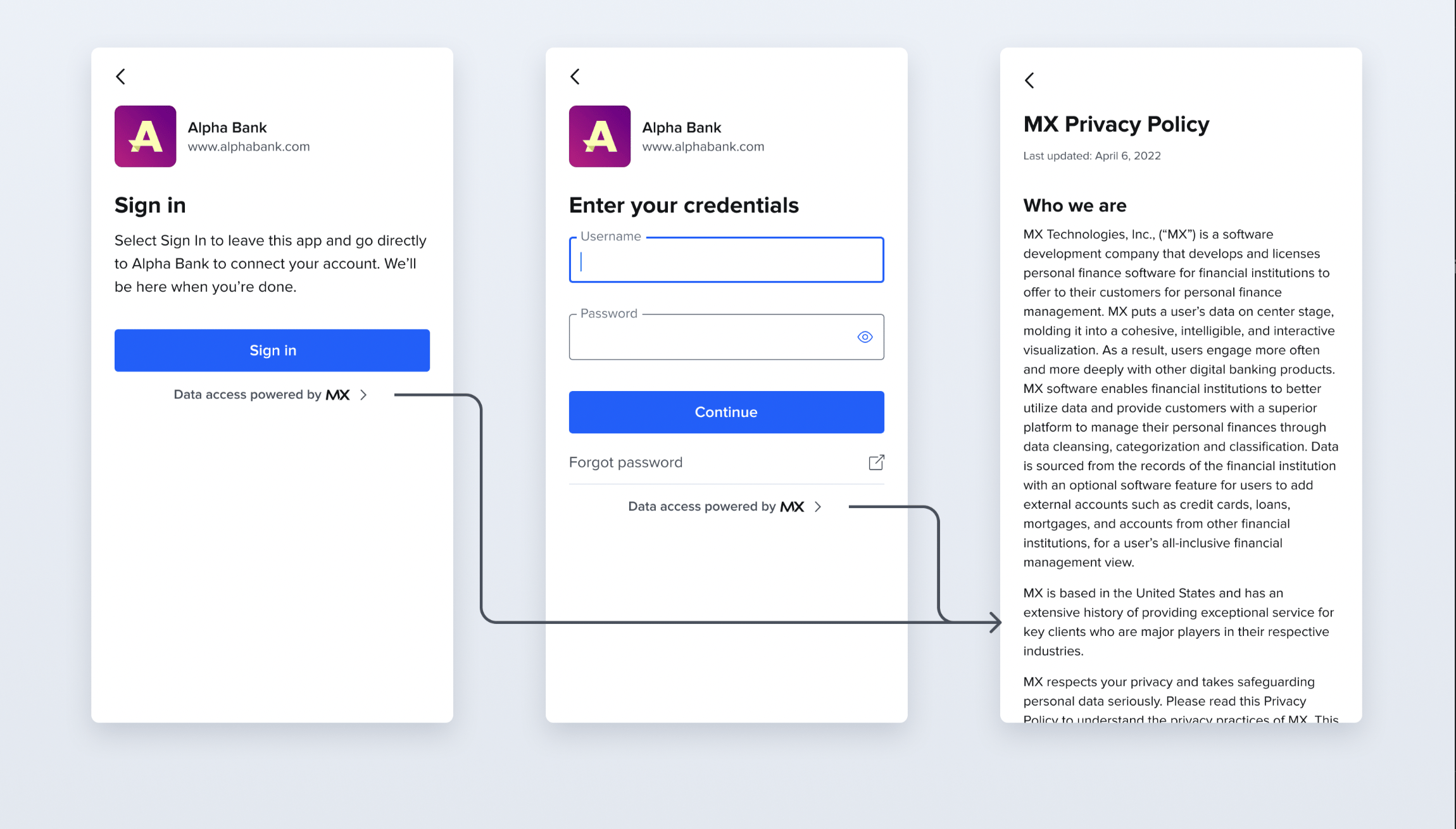
To further reinforce user trust and company transparency, we’ve updated the Connect Widget experience to help end users access all MX disclosures. End users can find the MX Privacy Policy and our data disclosures by selecting the “Data Access Powered by MX” link at the bottom of the Connect Widget. Selecting the “Data Access Powered by MX” link will navigate end users to a separate display that has the disclosures and links to MX policies.This change has already come into effect. No further client action is required.Instant Account Verification
For the Instant Account Verification product, the passed_validation field has now been added to the account_numbers object for the Platform and Nexus APIs. This field indicates whether the account and routing numbers contained in the object pass or fail MX’s internal validation parameters.Mobile BankingPersonal Finance Management
Mobile Banking
The minimum Android version supported has increased from Android 5 to Android 6. This change will impact all MXmobile Android builds and does not require any client action.MoneyMap/PFM
We’ve improved the support request workflow within MoneyMap. Now, when a user selects the Request Support button, MoneyMap displays a list of popular support issues by category instead of requiring the user to manually search for their issue. The client’s support issue is then routed to either MX or the client’s support team depending on the issue selected.This improvement will occur automatically on February 1, 2023. We require no action from the client or the end user. For more information on support ticket routing, please reach out to your MX account representative.Connect Widget
Connect Widget
Invalid Credentials View
The Connect Widget now displays an error message on the same screen when the end user inputs invalid credentials. Previously, if invalid credentials were provided, the user was directed to a different screen which provided the error message. If users wanted to re-enter the correct credentials, they had to select the back button. To simplify the user experience, the additional screen has been removed. The error message remains unchanged.No action is required by clients or end users to experience this change, it has been automatically updated in the Connect Widget experience.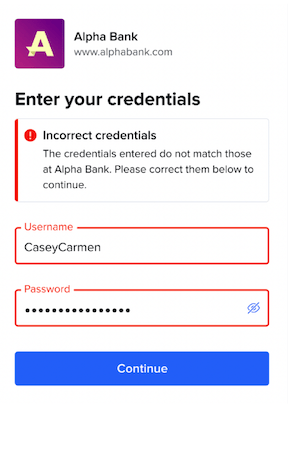
Search Institution User Experience
In the Connect Widget, if an end user is searching for their institution, the Select your institution screen displays a list of the most popular institutions. This update enables the search bar to remain visible when a user is scrolling through the list. Previously, if the end user scrolled down the list, the search bar would disappear and the user would need to scroll up to access it. Now, if a user does not see their institution in the list, they can access the search bar quickly and easily.No action is required by clients or end users to experience this change, it has been automatically updated in the Connect Widget experience.Connect Widget
Connect Widget
We are removing the disclosure screen from the Connect Widget on Oct. 11 in an effort to increase conversion rates and reduce user drop-off rates. Clients who would like to keep the disclosure screen can reach out to their MX delivery team or to MX support to have it re-added.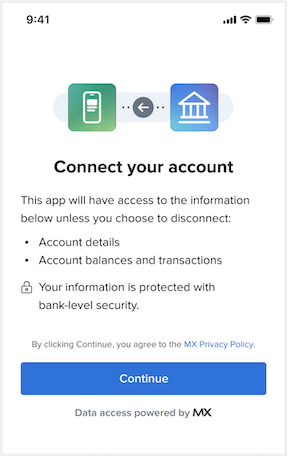
Mobile BankingFinancial Insights
Mobile Banking
Mobile Banking SDK
MXmobile is a fully-featured digital banking platform that empowers financial institutions and fintechs to deliver data-driven, contextual, and personalized experiences. The MXmobile SDK empowers clients to build their own experiences, instead of using MX development teams.By extending the core MXmobile solution, clients can experience an accelerated speed to market and implementation time. After installing the MXmobile SDK and integrating it with the Path SDK, clients can configure their features, add plugins that extend MXmobile’s core functionality, and customize their app’s colors, fonts, images, icons, user interface text, buttons, and components. By using the MXmobile SDK, clients can create their own mobile experience that’s powered by MX and true to their brand.Learn more about how the MXmobile SDK works at docs.mx.com/legacy-mobile-sdk/guides/getting-started.Ask questions or get started with the MXmobile SDK by reaching out to your delivery team.Path SDK
As a part of the MXmobile offering, the Path SDK is a sub offering of the MXmobile SDK. This software development kit enables MXmobile clients to use the MX Path platform to quickly build connections between their mobile applications, the MX Platform, and other data sources. Path connects MXmobile to the MX platform and any other data source MX clients may rely on and translates between both of these connections, despite how disparate those systems are.Historically, Path’s connections have been built only by MX, and MXmobile clients were unable to make changes on their own to the back-end connections their mobile application required. Using the Path SDK, MXmobile clients are empowered to define these connections and switch between them as needed without relying on MX to do it for them.Learn more about how the Path SDK works at docs.mx.com/path-sdk or visit the MX GitHub at github.com/mxenabled/path-sdk.Ask questions or get started with the Path SDK by reaching out to your delivery team.iOS version
MX now has the ability to limit use of an iOS version, based on SDKs that are incorporated into the MXmobile app. If an SDK is not supported back to iOS 11, MX can prevent users on older iOS versions from downloading an incompatible app. MXmobile will still support back to iOS 11, but MX can modify this on an individual client basis, depending on the client needs and SDK compatibilities.MXcommunity
MXcommunity is an online space for MX clients and partners to engage with other MX product users by exploring topics of interest, asking questions, and collaborating. Clients can discuss challenges, post reviews, submit product ideas, and engage with one another to democratize knowledge and improve client experience and outcomes. As the MXcommunity professional network grows, it will become the go-to place for clients to get advice from experts in the industry as they integrate and expand their portfolio of MX products.Explore and join MXcommunity at community.mx.com.Connect WidgetFinancial Insights
Connect Widget
We are enhancing the information we collect and analyze through Google Analytics to track in more detail where users drop off in the MX Connect Widget, instead of knowing only that they drop off at some point during the process. This will help us understand where we can improve.We’ve made some visual changes to the step when users manually add an account. These changes offer design consistency, improve accessibility (a11y), and provide information in English, Spanish, and Canadian French.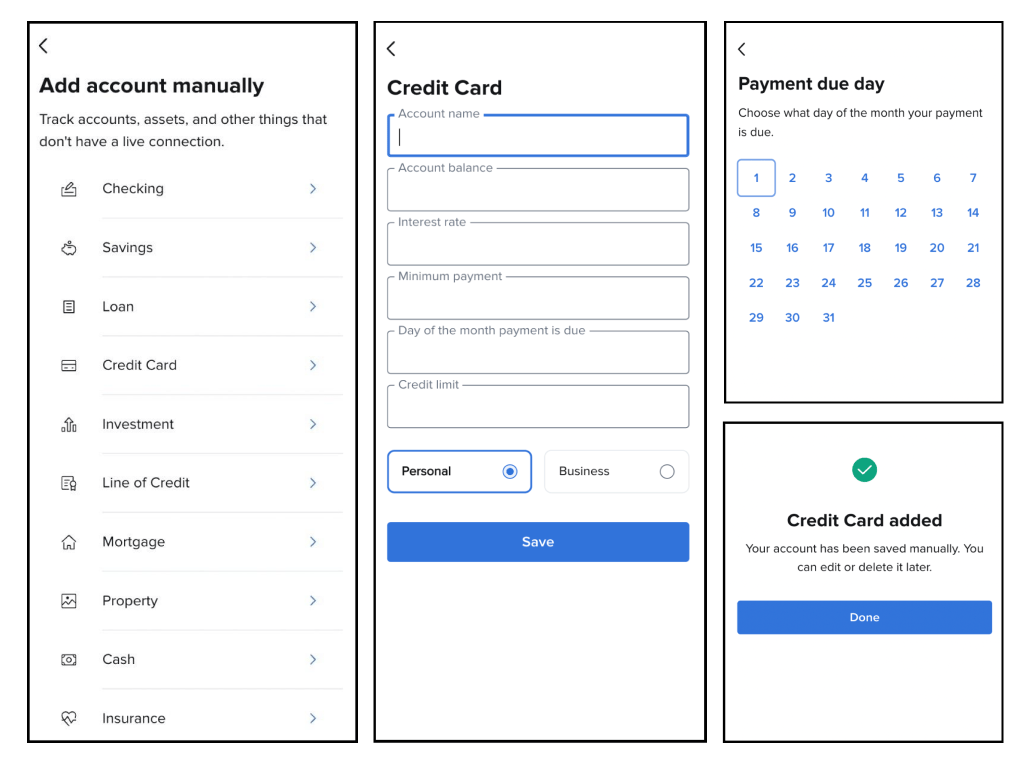
MXinsights
We have added or updated several insights:- The new Green Statement Fee insight shows a recent paper statement fee and reminds users they can save money — and the planet — by opting out of paper statements.
- The new Green Gas Purchases Summary insight explains gas spending frequency and patterns.
- The new Unexpected Subscription Payment insight informs users when a payment occurs for a subscription they have marked as canceled.
- The Weekly New Merchants insight is now dynamic, so it will update if users make changes to it. It notifies users that MX has identified one or more merchants they had not interacted with the previous week.
Connect WidgetInstant Account Verification
Processor Token
We have introduced Processor Tokens to the Instant Account Verification feature within the Platform API. Processor Tokens enable tokenized access for processors working with MX clients. Processors can exchange a token for the information, including payment account information, transaction history, identity data, and real-time account balance information. This reduces the need for clients to gather, store, and exchange sensitive data with processors.Processor Tokens will be live July 18 for clients to use. Clients must have the MX Instant Account Verification feature to use Processor Tokens. For more information on how Processor Tokens work, review MX’s developer documentation or talk to your MX contact.Connect Widget
We have made several enhancements in MXconnect:- Not all clients use standard credentials for authentication through MXconnect. For clients that require an API key, we have added a feature that allows us to present information about the authentication requirements for that institution. These instructions will guide users to successful connections.
- There is now a prompt that asks users for feedback about their connection experience. This feedback will help MX improve the experience for all users. This feature is live for all clients.
- We have enhanced the MXConnect interface in several ways to improve the user experience, including making a seamless framing experience, updating a title page, and tweaking some spacing and visuals.
Developer Documentation
We have been redesigning the MX Developer Documentation website at docs.mx.com to improve its usability. It will have simplified navigation options, including a list of all guides under Use Case buttons in the left navigation. You will see these changes soon.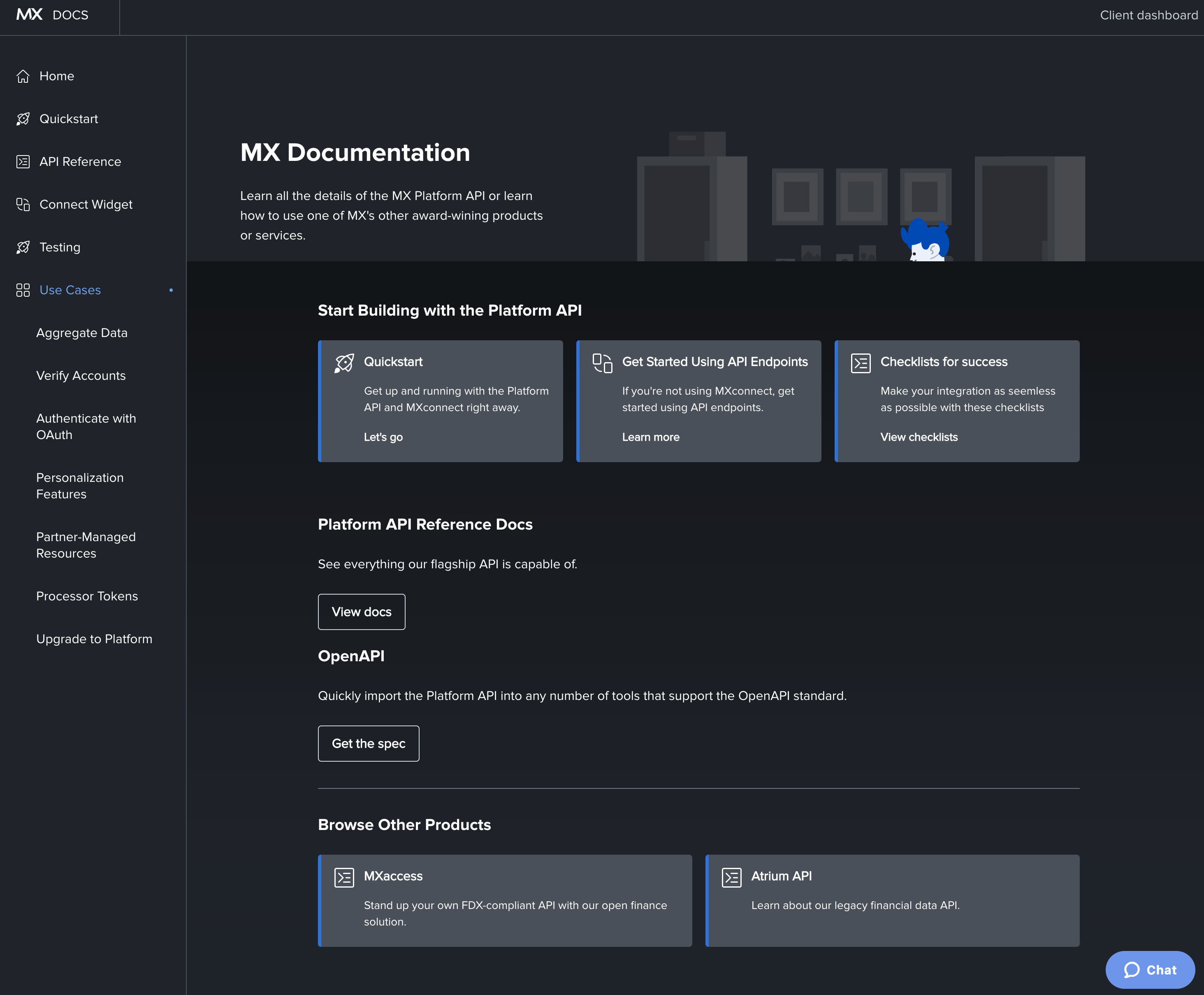
Connect Widget
In the Connect widget, aggregation clients will no longer have to manually set the
wait_for_full_aggregation field to true, as that will now be the default.This means that the widget will wait until any aggregation process is complete before firing a connected postMessage. As such, clients will have transactional data by the time the widget is closed. This change will reduce issues around data availability after the widget session.MX will automatically implement this change Tuesday, June 21, so clients will not need to do anything on their end.Financial Insights
MXinsights 1 Year Sweeper Worker
Summary
Technically, MXinsights users can scroll all the way back to the first insight that was ever created for them. In practice, no users are doing this. An unnecessary pileup of insights in our databases will lead to performance issues if not addressed. On Tuesday, March 1st, we implemented a sweeper worker that will automatically delete insights that are 1 year old or older for all end users on the platform. This sweeper worker will continue to delete insights that are older than 1 year. This impacts all MXinsights clients and MXinsights end users. However, we anticipate that the impact will go unnoticed because our analytics suggest nobody is scrolling back further than 1 year.What Is Happening?
We are implementing a sweeper worker that will automatically delete insights that are 1 year old or older for all MXinsights users on the platform. This sweeper worker will continue to delete insights that are older than 1 yearWhy is this Happening?
Our databases are being bogged down by millions of insights that are no longer relevant. If we don’t do something about it, we anticipate we will run into performance issues. This sweeper protects the user experience by protecting speed and performance.When Is This Happening?
Code was pushed on Tuesday March 1st, and the deletion process will be completed by Thursday March 3rd. The deletion process will then continue happening in the background for insights 1 year old or older.Who Does This Impact?
All MXinsights end users that scroll back 1 year into their insights (usually scroll back a couple of weeks)What Are the Impact(s)?
End users: This will only impact insights that are older than 1 year. The only way the end user would see an impact is if they scrolled back 1 year in their feed. We anticipate no users are doing that but we are working on implementing tracking mechanisms to know for sure.Clients/Partners: NoneWhat Does the Partner/Client Need to Do as a Result of This Change?
No action needed on the part of partners or clients.FAQ
Will analytics for clients be affected?No, clients will continue having access to all the end user insights even after they are deleted from their feed.Connect Widget
Updates
- For clients using Connect inside a WebView, we’ve improved the process of redirecting users back to their native app. The new
client_redirect_urlparameter should be used instead of theui_message_webview_url_schemeparameter. You can learn more in our API reference or integration guide.ui_message_webview_url_schemeis still supported, however. - We have expanded behavioral metrics to improve research on the user journey through the widget.