
MX Data Architecture
The MX platform is built on seven core resources: accessors, clients, users, members, institutions, accounts, and transactions.
Diagram
Here's how these resources relate to each other.
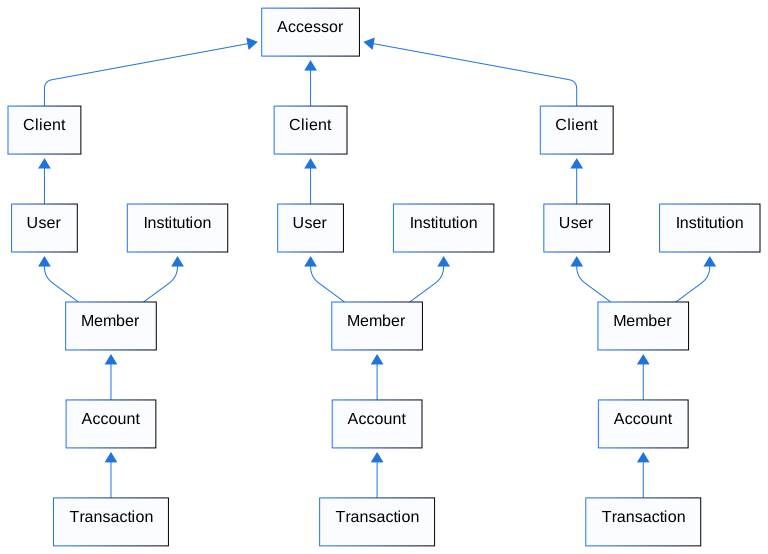
Resources
The following table describes each resource, its relationships, and who creates it.
| Resource | Description | Relationship | Created By |
|---|---|---|---|
| Accessors | Top-level hierarchy representing MX clients. Each has an API key for authentication and manages IP whitelisting. | Can have multiple clients | MX only |
| Clients | Individual MX clients within an accessor. Each has a client_id for authentication and serves as the customization point for product branding. Example: A banking provider serving 100 institutions has one accessor with 100 clients—one per institution. | Belongs to one accessor; can have multiple users | MX only |
| Users | End users whose financial data is aggregated and analyzed. | Belongs to one client; can have multiple members | MX clients |
| Members | Connection between a user and an institution. Stores credentials, handles MFA, and performs aggregation. Can have multiple accounts. Duplicates not allowed. Example: A user with checking and savings at Wells Fargo has one member with two accounts. | Belongs to one user; can have multiple accounts | MX clients or end users |
| Institutions | Financial institutions like Chase or Wells Fargo. A real-world institution may have multiple objects if divisions use separate systems. A client may set a default institution representing the partner organization itself. Example: Wells Fargo may have separate objects for mortgages, banking, and credit cards. | Referenced by members | MX only |
| Accounts | Individual financial accounts (checking, savings, mortgage, 401(k), and more). | Belongs to one member; can have multiple transactions | MX products, aggregation, or MDX On Demand |
| Transactions | Money movement into or out of an account (purchases, deposits, transfers, withdrawals, and so on). | Belongs to one account | MX products, aggregation, or MDX On Demand |